
Most blog articles spend hours obsessing over text content while completely ignoring the images that take up 60% of the page. That’s a mistake that costs ranking positions, page speed, and revenue.
Image SEO is the practice of optimizing every image on your site so search engines can read, understand, and rank them. It’s also the practice of making sure images don’t sink your overall site performance, which is one of the biggest ranking factors in modern search engine optimization.
In this article, we’ll walk through 8 image SEO best practices for 2026, including which tools to use and how each practice affects your overall search rankings.
Let’s get into it.
Key Takeaways:
- Image SEO is two practices in one: making images findable in image search AND making sure they don’t slow your site down. Both feed into traditional search rankings. Skip either half and you leave seo performance on the table.
- Alt text is the single biggest image SEO tip most teams get wrong. It’s not for keyword stuffing. It’s for accessibility and for telling Google what’s in the image. Write descriptive, natural alt text and you’ll see image search traffic compound over months.
- Page speed is a Google ranking factor, and images are usually the biggest page speed problem. Compressing images and resizing them correctly often improves page load times by 40-60% on image-heavy pages.
- The right image format matters more than people think. WebP and AVIF cut file sizes dramatically without visible quality loss, but only if your site serves them as fallbacks for browsers that need them.
- An image sitemap and structured data help Google Discover and other image-led products actually find your images. Without these, images sit invisible to half of Google’s image-related products.
- The complete image seo checklist is more than alt text. Format, file size, lazy loading, CDN delivery, sitemaps, and Open Graph tags all matter. The 8 best practices below cover the full picture.

Link building cheat sheet
Why do You Need Image SEO?
Two reasons: rankings and revenue.
For rankings, Google Search now uses image content as a direct ranking signal for many query types, and other search engines follow the same general approach.
When someone searches for a product, recipe, or tutorial, image search results appear at the top of the SERP alongside the regular results.
If your images aren’t optimized, you don’t appear in that real estate. That’s traffic you’re leaving on the table for competitors.
Beyond regular Google Search results, image-led discovery has expanded. Google Shopping and visual queries through Google Lens pull from sites that have done proper image optimization.
A well-optimized image catalog appears in places a poorly-optimized one doesn’t, and those placements drive qualified traffic that often converts at higher rates than generic search.
For revenue, page speed matters more than ever.
Google’s Core Web Vitals (which feed directly into search engine rankings) heavily weight Largest Contentful Paint. That metric is almost always an image.
A site with unoptimized images will get penalized on Core Web Vitals, will rank lower, and will lose conversions because slow pages don’t convert.
The kicker is that most sites have terrible image SEO and don’t know it.
A quick site audit will usually reveal hundreds of oversized images, missing alt text, and no image sitemap. Those are all easy wins waiting to be fixed.
Compress and Resize
The single biggest mistake teams make is uploading images straight from a phone or stock image library without compression.
A 5MB upload becomes a 5MB download for every visitor. Multiply by a thousand visitors and you’ve burned bandwidth your site can’t afford.
Use a plugin to automate image compression and optimize images on upload. WordPress users have ShortPixel, Smush, and Optimole.
These plugins all handle image optimization on upload and serve appropriately-sized versions to each visitor. For non-WordPress sites, services like TinyPNG, Squoosh, or ImageOptim handle the compression manually.
Image size matters separately from compression. An image displayed at 800px wide doesn’t need to be a 3,000px wide file.
Resize images to the largest dimension they’ll actually be displayed at, then let your compression plugin handle the rest. Combining these two practices drops image file sizes by 70-80% with no visible quality loss.
Lazy Loading
Lazy loading delays image loading until the user actually scrolls to the image. Without lazy loading, every image on the page loads on first visit, even images at the bottom that the user may never see.
For image-heavy pages (long articles, e-commerce category pages, image galleries), lazy loading can cut initial page load times by 50%+ on its own. That’s a massive page speed win for essentially zero effort.
Modern browsers support native lazy loading via the loading=”lazy” attribute on <img> tags.
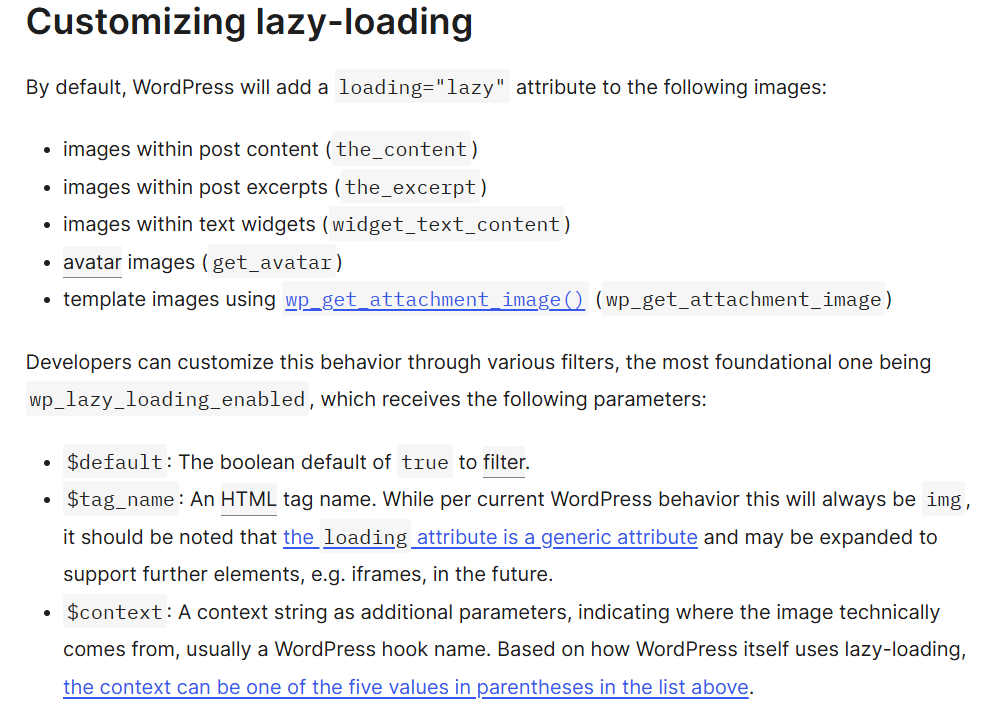
WordPress automatically adds this attribute as of version 5.5, so most WordPress sites get this for free. For other platforms, either add the attribute manually or use a JavaScript library like lozad.js.
One caveat: don’t lazy load images above the fold. Those should load immediately so the user sees content right away. Most lazy loading plugins exclude the first 1-2 images automatically.
Responsive Image Scaling
A responsive image is one that adapts its size based on the device viewing it. A 2000px-wide image makes sense on a desktop monitor but is overkill for a 400px-wide mobile screen.
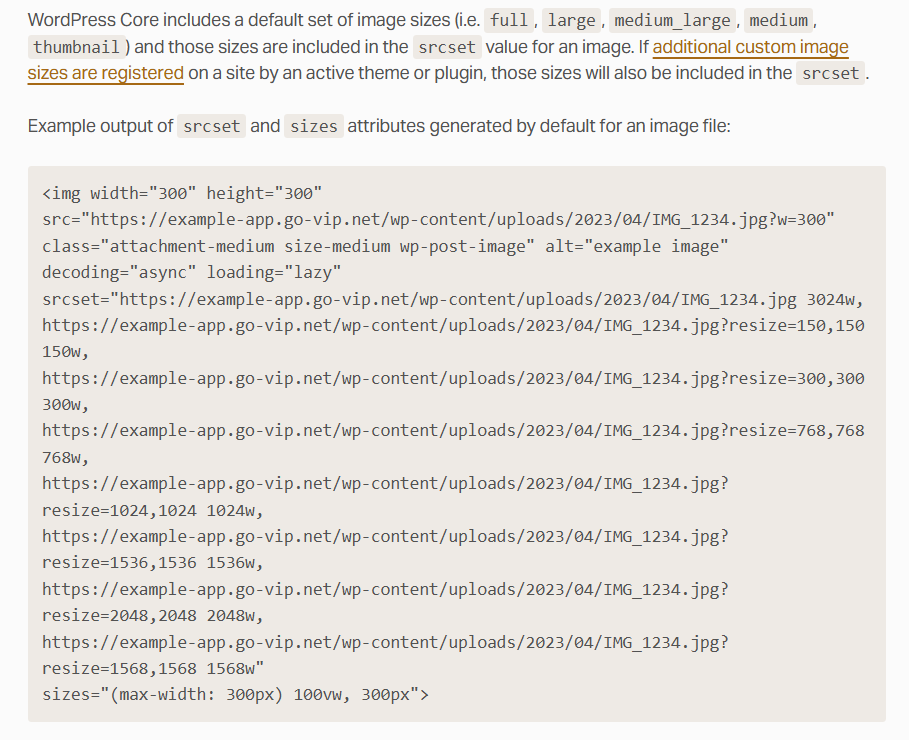
Modern browsers handle this via the srcset and sizes attributes on <img> tags. You provide multiple versions of the same image at different sizes, and the browser picks the right one based on device width.
For WordPress, this happens automatically through the built-in responsive images feature. For other platforms, your image compression plugin usually generates the responsive images for you on upload.
The performance gain on mobile is dramatic. A user on a slow mobile connection getting a 200KB version of an image instead of a 2MB version loads the page 10x faster.
Use the Right Format
The format you choose directly affects file size, quality, and browser compatibility.
The four main formats to know:
- JPEG: Best for photographs with lots of colors and gradients. Lossy compression, smaller files.
- PNG: Best for graphics with transparency or sharp edges (logos, icons, screenshots with text). Lossless, larger files.
- WebP: Modern format that handles both photos and graphics at 25-35% smaller file sizes than JPEG or PNG. Supported by all modern browsers.
- AVIF: Even newer format with 50%+ smaller files than JPEG. Browser support is growing fast.
For 2026, the right approach is to serve WebP or AVIF as the primary format with JPEG or PNG fallbacks for older browsers. Most modern CMSs and image plugins do this automatically when you upload an image file.
Add an Image Sitemap & Structured Data
An image sitemap is an XML file that lists every image on your site for search engines to crawl.
Without one, Google has to discover your images through normal page crawling, which means many images get missed entirely. The sitemap solves that.
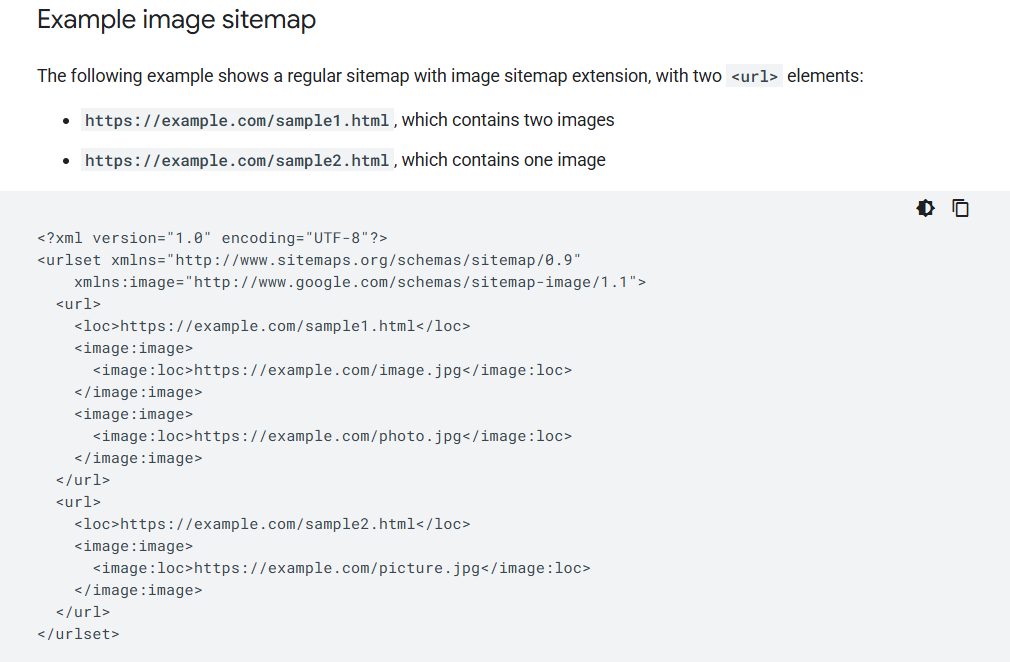
If you’re on WordPress, plugins like RankMath or All in One SEO generate your image sitemap automatically.
For other platforms, plugins like Google XML Sitemaps handle this, or you can generate the sitemap manually.
Structured data goes a step further. Adding ImageObject schema to your images tells search engines exactly what each image represents, who created it, and what it depicts.
This is especially important for image-heavy content displayed in mobile feeds, and for product images that need to appear in Google Shopping.
Adding both is what gets your images into Google’s image-based products.
Image Name & Alt Text
Search engines don’t see images the way humans do. They read the file name, the alt tag, and surrounding text to figure out what an image shows.
Your image file name should describe what’s actually in the image. “DSC_4527.jpg” tells Google nothing. “blue-running-shoes-side-view.jpg” tells Google exactly what’s shown and gives you a keyword opportunity. A clean image file name is one of the easiest wins in image SEO.
Alt text is even more important. Every image should have descriptive alt text that:
- Describes what’s in the image in plain language
- Includes your target keyword naturally (if relevant)
- Stays under 125 characters
- Is unique per image (no duplicates)
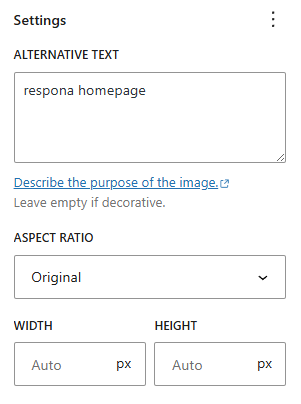
Avoid keyword stuffing. “blue running shoes blue running shoes blue running shoes” is worse than no alt text at all. Write alt text for accessibility first (it’s read aloud by screen readers), and the SEO benefits follow.
The image title attribute used to matter for SEO but no longer carries much weight. Set the image title for usability if you want, but don’t worry about optimizing it for rankings.
Enable Caching & Use a CDN
A content delivery network serves your images from a server geographically closer to each user.
Without a CDN, every visitor anywhere in the world pulls images from your origin server, which is slow for anyone far from that server.
With a CDN (Cloudflare, BunnyCDN, KeyCDN, AWS CloudFront), images get cached on edge servers around the world.
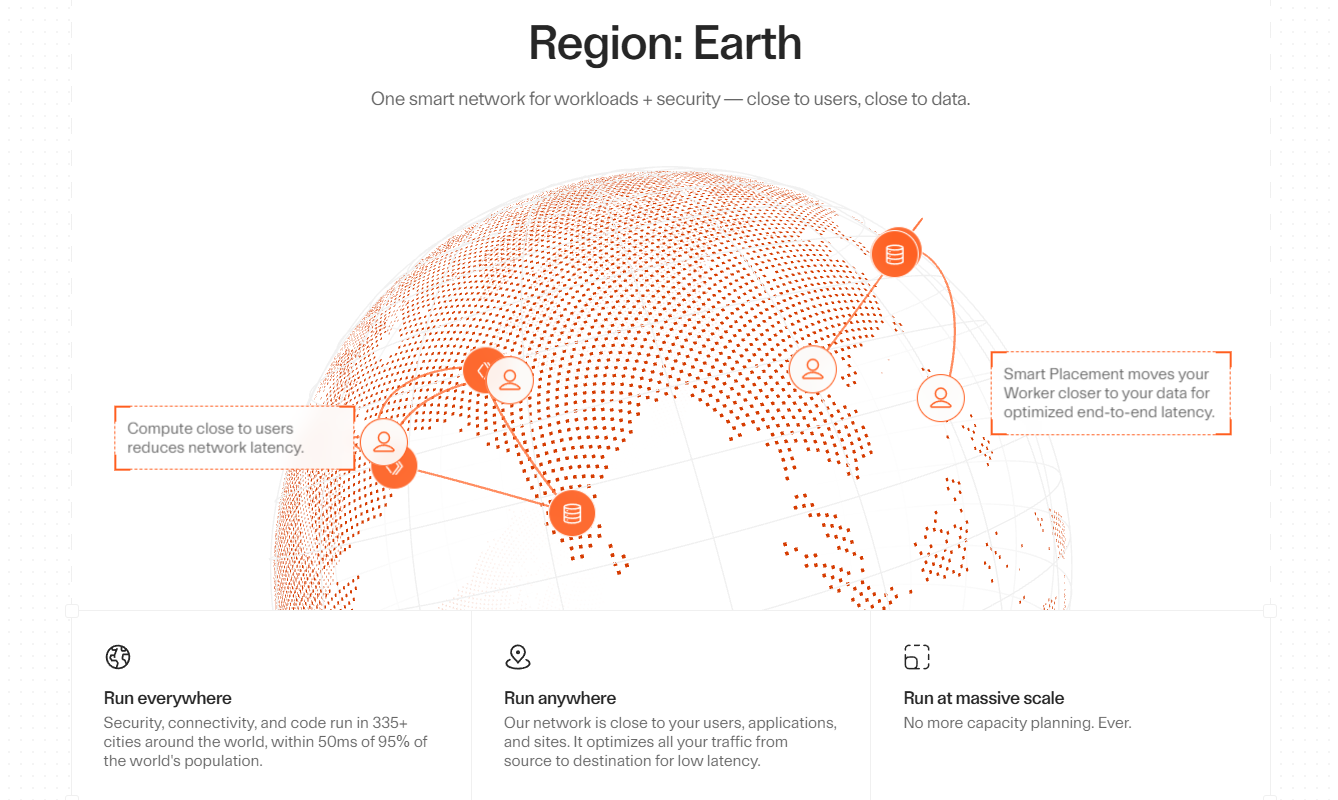
A user in Tokyo pulls images from a Tokyo edge server, not from your origin in Virginia. Load times drop significantly.
Combined with browser caching (which stores images on the user’s device for return visits), you cut image load times to near-zero for repeat visitors.
This is one of the easiest wins in image SEO that most small sites skip.
For most sites, Cloudflare’s free tier handles 90% of the CDN need.
Larger sites and e-commerce stores benefit from paid CDN plans with image-specific features like on-the-fly resizing and format conversion.
Use OpenGraphs
Open Graph tags tell social media platforms how to display your content when someone shares it.
Without proper Open Graph image tags, shares on Facebook, LinkedIn, Slack, and most other social media platforms show no image at all, just text.
The Open Graph image tag (<meta property=”og:image”>) specifies which image to display.
Add this to every page, with a 1200×630 pixel image as the recommended size. X (formerly Twitter) uses a separate spec for its preview meta tags, though most platforms have moved toward using Open Graph as a fallback when that spec isn’t set.
For WordPress, most major SEO plugins handle Open Graph and Twitter Card tags automatically once you set a featured image. For other platforms, add the meta tags manually or use a plugin.
Link building cheat sheet
Now Over to You
The 8 image seo best practices above cover the full picture. Pick the lowest-hanging fruit (probably compression and alt text) and work through every seo best practice on the list one at a time.
Once your on-page work is done, the next ranking lever is backlinks.
If you’d rather not run outreach in-house, place an order with Respona.
Share your target pages and target keywords with our team, and we’ll handle the prospecting, pitching, and securing live placements that drive both Google rankings and AI citations.
Frequently Asked Questions (FAQ)
What is image SEO and why does it matter?
Image SEO is the practice of optimizing images so search engines can find, understand, and rank them, while also making sure images don’t slow your site down.
It matters because images make up 60%+ of a typical page’s file size, which directly affects page speed (a Google ranking factor), and because image-led traffic drives significant visits for visual queries.
What’s the difference between image search and visual search?
Image search is what you do when you type a query into Google and get a grid of image results back. Visual search is what you do with Google Lens when you upload or point a camera at an image and ask Google what it is.
Both depend on the same image SEO fundamentals, but this approach specifically relies on Google’s ability to read image content rather than alt text or surrounding context.
How do I check my image SEO performance?
Run audits with Google PageSpeed Insights, Ahrefs, or Semrush. All three flag oversized images, missing alt text, missing image sitemap, and image-related Core Web Vitals issues.
Google PageSpeed Insights specifically scores page speed and highlights image-related issues by default, which makes it a fast first check for most teams.
Should I use stock images or original images?
Original images outperform stock images for image search rankings in most cases. Search engines can identify duplicate stock images across thousands of sites, which dilutes ranking power.
An original image also tends to earn more backlinks from publications looking for fresh visuals.
That said, a high-quality stock image is still better than no image at all, especially when producing originals isn’t fast enough.
Does compressing images hurt image quality?
When done correctly, no. Modern compression algorithms (especially WebP and AVIF) can reduce file size by 60-80% while keeping the image visually identical to the original image. The trick is using the right compression level.
Most compression plugins default to “lossy” compression at around 80% image quality, which is the sweet spot for SEO image optimization.
What’s the best image format for SEO in 2026?
WebP is the best choice for most use cases. It’s supported by all modern browsers, delivers 25-35% smaller file sizes than JPEG or PNG, and handles both photos and graphics. AVIF is even better on file size, but browser support is still catching up.
For maximum compatibility, serve WebP with JPEG fallback for older browsers.
How do I get my images into Google Image Search?
Three things: an image sitemap so Google can discover your images, descriptive alt text and file names so Google understands what each image shows, and structured data (ImageObject schema) so Google has full context.
Once those are in place, Google’s broader image products pull from your inventory automatically.
Do I need Yoast SEO to handle image SEO on WordPress?
You don’t need Yoast SEO specifically, but you do need some SEO plugin to handle image sitemap generation, Open Graph, and social preview meta tags. It’s the most popular option, with RankMath as a strong alternative.
Either handles the technical side of image SEO automatically for WordPress sites.
What’s the most overlooked image SEO tip?
Adding a proper alt tag to every image is the most overlooked best practice in this space. Most teams either skip alt text entirely or stuff it with keywords.
The correct approach is descriptive, natural language that describes what’s in the image in 1-2 sentences. Image search results reward descriptive alt text and penalize keyword stuffing.
Can image SEO help with content marketing?
Yes. Original visual content (custom illustrations, data visualizations, infographics) earns backlinks and social media shares at much higher rates than text-only content.
A single shareable infographic can drive hundreds of backlinks because publishers need visuals to break up their text. Treating visual content as a strategic asset, not just decoration, pays off in both rankings and link building.