
I use ChatGPT on a daily basis.
It helps write and optimize content, make sense of SEO data – and even assists with keyword research.
Just a year or two ago trusting ChatGPT with your SEO seemed like a crazy idea.
Now it’s gotten so good it’s crazy NOT to use it.
In this article, I’ll share our favorite collection of ChatGPT prompts for SEO, covering everything from SEO content writing to technical SEO tasks.
Let’s get into it.

Link building cheat sheet
Should You Trust ChatGPT with SEO?
Before I’ll dive into ChatGPT prompts for SEO, we must point out the obvious: on its own, ChatGPT is NOT a real SEO tool.
It is a language model. Yes, it can help, and a lot of the time get things very right.
But you can’t replace real SEO expert.
It is a tool to assist and speed up your own (or your team’s) work.
If you have no previous experience in search engine optimization, it’s best to hire a professional.
Just asking GPT to optimize your site – even with the best ChatGPT prompts – will lead to disaster.
With that out of the way, let’s talk about how to actually get ChatGPT to do what you want it to do.
What Makes a Good Prompt?
As you know, if you just ask AI to “generate you an SEO-optimized article”, it will probably hallucinate and give you a big nothingburger with some fluff on the side.
With ChatGPT, the more you put into it, the more you will get out.
A good ChatGPT prompt is clear, specific, and goal-driven.
See this example:
BAD: “Help me with SEO”
GOOD: “Create an SEO-optimized outline for a blog post targeting the keyword ‘email marketing tools. Target length = 2000 words.”
In fact, the outline for this very article you’re reading was partially expanded by ChatGPT:
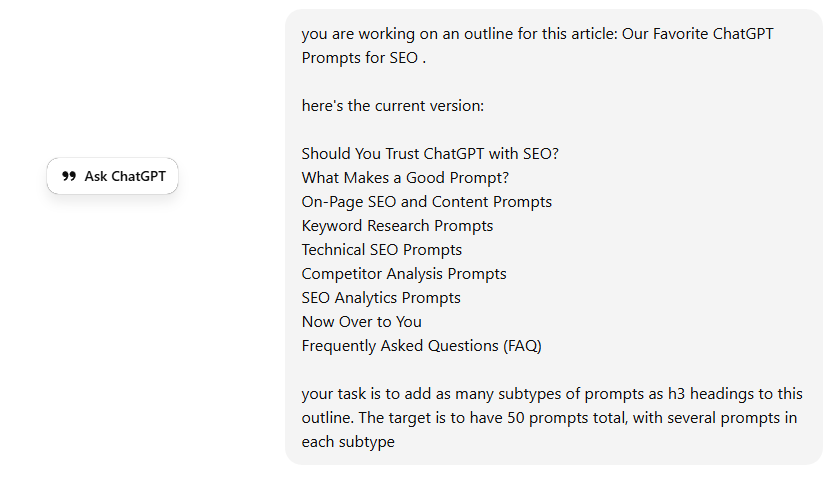
The trick is simple: don’t make ChatGPT think for you, make it execute for you
The key is to be clear and specific.
A good SEO prompt explains exactly what you want to achieve, adds context (industry, audience, intent), and removes as much guesswork as possible.
The more information you give ChatGPT, the better the output will be.
Constraints matter too.
Things like word count, tone, format, and search intent help keep the response focused and usable.
If you don’t tell ChatGPT how to respond, you’ll often spend more time editing than you saved.
Last but not least, the best results come from iteration, not one-shot prompts.
Use ChatGPT to outline, refine, expand, and optimize, one step at a time.
It’s great for small tasks, but it fails miserably when it has to do all of them at once.
Now that you know why the following ChatGPT SEO prompts prompts are the way they are, let’s take a look at the list.
On-Page SEO and Content Prompts
This is by far the most common application of ChatGPT in SEO.
ChatGPT is an awesome writing assistant for SEO content creation. As long as you use it as that: a writing aid, not a writer replacement
Blog Post Outline Prompts
Prompt #1:
“Create an SEO-optimized blog post outline for the keyword ‘[PRIMARY KEYWORD]’.
Target search intent: [informational/commercial].
Include an H1, logical H2s and H3s, related subtopics, and questions to answer.
Target length: [X] words.”
When to use it:
This is your go-to example prompt for creating a solid, rank-worthy article structure from scratch. It helps you cover the topic thoroughly without missing obvious sections or search intent signals.
Prompt #2:
“Create a detailed blog post outline for the keyword ‘[PRIMARY KEYWORD]’ based on what is currently ranking on page one.
Identify common sections competitors cover and suggest additional angles to stand out.
Target length: [X] words.”
When to use it:
Use this when you already know the SERP is competitive and you want to avoid writing a generic article. This ChatGPT prompt is great for uncovering content gaps and finding ways to differentiate instead of copying what already exists.
Prompt:
“Create an SEO-optimized blog post outline for the keyword ‘[PRIMARY KEYWORD]’ with commercial intent.
Emphasize comparisons, use cases, decision-making criteria, and natural CTA placement.
Target length: [X] words.”
When to use it:
This works best for bottom-of-the-funnel or product-adjacent blog content. It helps shape the article around buyer intent instead of pure information, which is key for pages meant to convert, not just rank.
SEO-Optimized Content Writing Prompts
Prompt #4:
“Write the content for the following section based on this outline:
[PASTE SECTION OUTLINE].
Optimize for the keyword ‘[PRIMARY KEYWORD]’ and include relevant semantic keywords naturally.
Match a clear, conversational tone and avoid fluff.”
When to use it:
This is ideal when you already have a strong outline and want to expand it without losing structure. Writing section by section keeps ChatGPT focused and dramatically improves SEO content quality compared to generating a full article at once.
Prompt #5:
“Rewrite and optimize the following content for SEO without changing its meaning:
[PASTE CONTENT]
Improve clarity, structure, and keyword usage while keeping it natural and human-sounding.”When to use it:
This works best for refreshing existing SEO content that underperforms. It’s a fast way to clean up structure, reduce fluff, and make an article more search-friendly without starting from scratch.
Meta Title and Meta Description Prompts
Prompt #6:
“Write 5 SEO-optimized meta titles and meta descriptions for the page targeting ‘[PRIMARY KEYWORD]’.
Keep titles under 60 characters and meta descriptions under 155 characters.
Focus on clarity, relevance, and click-through rate.”
When to use it:
This is your default prompt for most pages. It gives you multiple variations to test while staying safely within SERP limits and SEO best practices.
Prompt #7:
“Write meta titles and descriptions for the keyword ‘[PRIMARY KEYWORD]’ that are optimized for clicks.
Highlight a clear benefit, unique angle, or pain point, and include a light CTA where appropriate.
Follow Google character limits.”
When to use it:
Use this when rankings are decent but CTR is underwhelming. This prompt helps you reframe the page around user motivation rather than just keyword placement.
Prompt #8:
“Analyze the current page-one results for ‘[PRIMARY KEYWORD]’ and write meta titles and descriptions that stand out from competing pages.
Avoid repeating common phrases used by competitors.
Stay within recommended character limits.”
When to use it:
This is perfect for competitive SEO keywords where every result looks the same. It helps you avoid blending into the SERP and instead gives searchers a reason to click your result over others.
Header Structure (H1–H6) Prompts
Prompt #9:
“Create an SEO-friendly header structure (H1–H3) for a page targeting ‘[PRIMARY KEYWORD]’.
Ensure the hierarchy is logical, avoids keyword stuffing, and fully covers search intent.
Output headings only.”
When to use it:
This is your baseline prompt for organizing a page before any writing happens. It’s especially useful when you want to sanity-check structure and avoid messy or repetitive headings.
Prompt #10:
“Create a header structure (H1–H5) for the keyword ‘[PRIMARY KEYWORD]’ optimized for [informational/commercial] intent.
Emphasize clarity, scannability, and user flow.
Avoid generic or filler headings.”
When to use it:
This prompt shines when user intent really matters, especially for commercial or comparison-style pages. It helps shape the page around how users actually read and make decisions, not just around keywords.
Content Refresh & Optimization Prompts
Prompt #11:
“Review the following content and identify sections that are outdated, redundant, or unnecessary:
[PASTE CONTENT].
Suggest what to remove, rewrite, or consolidate to improve SEO and readability.”
When to use it:
This is perfect for older content that’s bloated or unfocused. Pruning often improves SEO performance more than adding new content, and this prompt helps you do it intentionally.
Prompt #12:
“You are keyword-optimizing this article:
[PASTE ARTICLE].
Here are the SEO keywords to optimize, including their current mention count and recommended range:
ai featured snippets: 1 → 2 mentions
featured snippet: 3 → 10+ mentions
ai overview: 0 → 3 mentions
Increase or decrease keyword usage naturally without keyword stuffing.
Do not change meaning or tone.
Return the revised content only.”
When to use it:
Best for fine-tuning keyword density without rewriting the entire article. This keeps changes minimal and controlled.
Works best when you have insights from a keyword optimization tool like MarketMuse.
Internal Linking Prompts
Prompt #13:
“Review the internal links in the following content:
[PASTE ARTICLE].
Suggest improved anchor text where relevant, keeping it natural and aligned with target keywords.
Avoid exact-match anchors unless they fit organically.”
When to use it:
Use this when internal links already exist but aren’t pulling their weight. It’s especially useful for cleaning up generic anchors like “click here” or “learn more.”
Prompt #14:
“Given this article and the following list of internal pages:
[PASTE ARTICLE]
[PASTE LIST OF INTERNAL URLs OR PAGE TOPICS]”
Recommend where and how to add internal links to support SEO and user flow.
Prioritize high-impact sections like introductions, key subheadings, and summaries.”
When to use it:
This works best when you’re intentionally pushing authority to specific pages. It helps you place links strategically instead of randomly sprinkling them throughout the content.
Featured Snippet Optimization Prompts
Prompt #15:
“Rewrite the relevant section of this content to target a paragraph-style featured snippet for the keyword ‘[PRIMARY KEYWORD]’:
[PASTE CONTENT OR SECTION].
Provide a clear, direct answer in 40–60 words immediately after a relevant heading.”
When to use it:
Use this when the SERP shows a short definition or explanation snippet. This prompt helps you deliver a clean, concise answer that search engines can easily extract.
Prompt #16:
“Optimize this content to target a list-style featured snippet for the keyword ‘[PRIMARY KEYWORD]’
[PASTE CONTENT OR SECTION].
Use a clear heading, an introductory sentence, and a numbered or bulleted list.”
When to use it:
This works best for how-tos, steps, tools, or comparisons. List snippets are common, and this prompt helps structure your content exactly how Google tends to display it.
Content Readability and UX Prompts
Prompt #17:
“Improve the readability and flow of the following content without changing its meaning:
[PASTE CONTENT].
Shorten sentences, break up long paragraphs, and make the content easier to scan.”
When to use it:
Use this when content feels dense or hard to read, even if it’s technically “optimized.” Better readability improves engagement, time on page, and overall user experience.
Prompt #18:
“Rewrite the following content for a [BEGINNER / NON-TECHNICAL / EXECUTIVE] audience:
[PASTE CONTENT].
Preserve key ideas while simplifying language and explanations.”
When to use it:
Use this when the content is accurate but mismatched to the audience. Reducing cognitive load often improves conversions just as much as ranking improvements.
Keyword Research Prompts
I use ChatGPT for the first stage of keyword research as part of our overall SEO strategy.
It’s great for generating ideas that you may not have thought of yourself.
However, once it gives you ideas, you still need to run them through an SEO tool like Ahrefs to check their metrics, and then prioritize them by keyword difficulty and traffic potential.
DO NOT skip this step – on their own, keywords are essentially a shot in the dark.
YOU NEED a proper keyword tool to actually make use of these content ideas.
Seed Keyword Generation Prompts
Prompt #19:
“Generate a list of seed keywords related to the topic ‘[MAIN TOPIC/PRODUCT/SERVICE]’.
Focus on broad, high-level terms that could be expanded into long-tail keywords later.
Exclude branded keywords.”
When to use it:
This is perfect at the very start of keyword research. It helps you map the topic space before diving into tools or expanding into more specific queries.
Prompt #20:
“Generate seed keywords based on the main pain points of [TARGET AUDIENCE].
Focus on how users would phrase problems and needs in search queries.”
When to use it:
This is great for uncovering non-obvious keyword opportunities. Pain-driven seeds often lead to high-intent content ideas that competitors overlook.
Long-Tail Keyword Discovery Prompts
“Generate long-tail keyword ideas for ‘[PRIMARY KEYWORD]’ using common modifiers and questions.
Include how, why, best, vs, for, and use-case variations.”
When to use it:
Use this when building informational or comparison content. Modifier-based long-tails are great for capturing users deeper in the research phase.
Prompt #22:
“Generate long-tail keyword ideas for ‘[PRIMARY KEYWORD]’ based on different use cases, industries, or user scenarios.
Focus on queries with practical or problem-solving intent.”
When to use it:
This works especially well for SaaS and B2B SEO. Use-case long-tails tend to convert better and often have far less competition than generic keywords.
Search Intent Classification Prompts
Prompt #23:
“Classify the search intent for the following keywords:
[PASTE KEYWORDS].
Label each as informational, commercial, transactional, or navigational, and briefly explain why.”
When to use it:
This is your go-to prompt for quickly organizing a keyword list. It helps you avoid targeting the wrong intent with the wrong type of page.
Prompt #24:
“Evaluate whether the following content matches the search intent for the keyword ‘[PRIMARY KEYWORD]’:
[PASTE CONTENT]
Identify mismatches and recommend specific changes.”
When to use it:
This is perfect for diagnosing why a page isn’t performing. Intent mismatch is a common issue, and this prompt helps surface it fast.
Keyword Clustering Prompt
Prompt #25:
“Cluster the following keywords based on search intent and topical similarity:
[PASTE KEYWORDS].
Group keywords that could be targeted on the same page and explain your reasoning.”
When to use it:
This is ideal for organizing large keyword lists and avoiding keyword cannibalization. It helps you decide how many pages you actually need, and what each page should target.
Semantic & LSI Keyword Prompts
Prompt #26:
“Generate a list of semantic and LSI keywords related to the primary keyword ‘[PRIMARY KEYWORD]’.
Focus on closely related concepts, synonyms, and subtopics that support topical relevance.”
When to use it:
This is useful when you want to strengthen topical authority without repeating the same SEO keyword over and over. Semantic keywords help search engines understand context, not just exact matches.
Prompt #27:
“Analyze the following content and identify missing semantic or LSI keywords relevant to ‘[PRIMARY KEYWORD]’:
[PASTE CONTENT].
Suggest where these terms could be added naturally.”
When to use it:
This is great for refreshing existing content. It helps you improve relevance and depth without stuffing or rewriting the entire page.
Question-Based Keyword Prompts (PAA-style)
Prompt #28:
“Generate a list of question-based keywords related to ‘[PRIMARY KEYWORD]’.
Focus on popular questions users might ask at different stages of the buyer or research journey.”
When to use it:
This is great for expanding informational content and uncovering real user questions. PAA-style keywords often make excellent subheadings and FAQ sections.
Prompt #29:
“Generate and group question-based keywords for ‘[PRIMARY KEYWORD]’ by search intent.
Separate informational, commercial, and comparison-style questions.”
When to use it:
Use this when planning long-form content or pillar pages. Grouping questions by intent helps you decide what to answer on a single page versus separate articles.
Keyword Prioritization Prompts
Prompt #30:
“Prioritize the following keywords based on SEO opportunity:
[PASTE KEYWORDS WITH METRICS IF AVAILABLE].
Consider search intent, estimated difficulty, and potential business impact.”
When to use it:
This is your go-to prompt when you have a long keyword list and limited resources. It helps you focus on keywords that are most likely to deliver results first.
Prompt #31:
“Prioritize the following keywords based on how easily they could be targeted by optimizing existing content instead of creating new pages:
[PASTE KEYWORDS]
[PASTE LIST OF EXISTING PAGES OR TOPICS].”
When to use it:
This works best for established sites with a lot of content. It helps you maximize ROI by improving what you already have before creating something new.
Technical SEO Prompts
Technical SEO is mostly about optimizing your website for crawlability and fixing page speed.
A lot of it involves code.
Believe it or not, ChatGPT is actually quite good with code, especially HTML.
So long as you have a second set of eyes to make sure it won’t break your website, AI is awesome at cutting down time required to fix your technical performance.
Site Structure and URL Optimization Prompts
Prompt #32:
“Analyze how search engines might crawl this page within the site structure:
[PASTE SITE STRUCTURE DESCRIPTION].
Suggest changes to improve crawl efficiency and discoverability.”
When to use it:
Use this when working on site architecture or internal linking at scale. Better crawl paths often lead to faster indexing and more consistent rankings.
Prompt #33:
“Evaluate the following URLs and suggest SEO-friendly alternatives where needed:
[PASTE URL LIST].
Focus on clarity, keyword relevance, and consistency while avoiding unnecessary parameters.”
When to use it:
This is perfect for identifying ugly or confusing URLs that hurt usability and SEO. It’s especially useful before migrations or large-scale cleanups.
Page Speed Optimization Prompts
Prompt #34:
“Based on these page speed issues, suggest specific optimization actions:
[PASTE IDENTIFIED ISSUES OR TOOL OUTPUT].
Separate quick wins from more complex, developer-heavy fixes.”
When to use it:
This is great for turning diagnostics into a to-do list. It’s especially useful when you need to communicate clearly with developers or stakeholders.
Prompt #35:
“Evaluate how the following page speed issues might impact SEO and user experience:
[PASTE SPEED METRICS OR TOOL OUTPUT].
Identify which issues are most likely to affect rankings or conversions.”
When to use it:
Use this when prioritizing work across teams. It helps justify speed improvements by tying them back to SEO and UX outcomes.
Schema Markup & Structured Data Prompts
Prompt #36:
“Based on the following page content, identify which schema markup types are most appropriate:
[PASTE PAGE CONTENT OR URL].
Explain why each schema type applies.”
When to use it:
Use this when you’re not sure which schema is worth implementing. It helps avoid over-marking pages or using irrelevant structured data.
Prompt #37:
“Generate JSON-LD schema markup for the following page using the appropriate schema type:
[PASTE PAGE CONTENT OR DETAILS].
Ensure the markup follows Google’s structured data guidelines.”
When to use it:
This is perfect when you already know what schema you need and just want clean, valid markup. It saves time and reduces implementation errors.
Prompt #38:
“Review the following schema markup and suggest improvements or fixes:
[PASTE SCHEMA CODE].
Identify missing properties and opportunities to enhance rich result eligibility.”
When to use it:
Use this when schema is already implemented but not delivering results. It helps you spot gaps that could unlock richer SERP features.
International SEO (Hreflang) Prompts
Prompt #39:
“Given the following target countries and languages:
[PASTE COUNTRIES & LANGUAGES],
recommend an hreflang strategy, including URL structure and implementation approach.”
When to use it:
Use this when planning international expansion or restructuring an existing global site. It helps you choose the right setup before touching code.
Prompt #40:
“Generate hreflang tags for the following set of URLs and language/country targets:
[PASTE URL LIST WITH LANGUAGE / COUNTRY PAIRS].
Include x-default where appropriate.”
When to use it:
This is perfect for avoiding manual errors when implementing hreflang. It saves time and reduces the risk of incorrect annotations.
Prompt #41:
“Review the following hreflang implementation and identify issues or inconsistencies:
[PASTE HREFLANG TAGS OR PAGE SOURCE].
Suggest fixes based on Google’s hreflang guidelines.”
When to use it:
Use this when international pages aren’t ranking correctly or are appearing in the wrong regions. Hreflang errors are common and costly if left unchecked.
JavaScript SEO Prompts
Prompt #42:
“Analyze the following page setup and identify potential JavaScript SEO issues:
[PASTE TECHNICAL DETAILS].
Focus on rendering, content visibility, and indexability.”
When to use it:
Use this when a JS-heavy page isn’t ranking or indexing as expected. It helps surface common rendering pitfalls before you dig into deeper technical SEO audits.
Prompt #43:
“Evaluate whether this page’s JavaScript implementation is suitable for SEO:
[PASTE PAGE DETAILS].
Compare client-side rendering, server-side rendering, and dynamic rendering options.”
When to use it:
This is useful during site rebuilds or framework migrations. It helps you make informed decisions instead of blindly trusting a tech stack.
Prompt #44:
“Suggest SEO-safe improvements for the following JavaScript-powered page:
[PASTE PAGE DETAILS OR CODE SNIPPETS].
Focus on improving crawlability, indexing, and content discovery.”
When to use it:
Use this when working alongside developers. It helps translate technical SEO concerns into actionable technical recommendations they can actually implement.
Competitor Analysis Prompts
Whether you’re trying to look up keywords your competitors are ranking for or trying to figure out what makes their content rank above yours, ChatGPT can offer a valuable perspective.
Just make sure to back up all competitor research suggestions it provides you with real SEO data from a tool like Ahrefs.
Competitor Content Gap Analysis Prompts
Prompt #45:
“Compare our content to the following competitor pages:
[PASTE YOUR PAGE]
[PASTE COMPETITOR URLS].
Identify topics and subtopics competitors cover that we’re missing.”
When to use it:
Use this when your page is underperforming despite solid SEO optimization. Missing topical coverage is one of the most common reasons competitors outrank you.
Prompt #46:
“Analyze the following competitor pages and identify keyword gaps relative to our content:
[PASTE YOUR CONTENT]
[PASTE COMPETITOR URLS].
Highlight high-impact keywords we should consider adding.”
When to use it:
This works well when competitors rank for variations you don’t. It helps you expand coverage without drifting off-topic.
SERP Comparison Prompts
Prompt #47:
“Analyze the current page-one results for the keyword ‘[PRIMARY KEYWORD]’.
Summarize the common content types, formats, and angles that are ranking.”
When to use it:
Use this when entering a new SERP or reassessing an existing one. It helps you quickly understand what search engines is rewarding before you create or optimize content.
Prompt #48:
“Compare the page-one results for ‘[PRIMARY KEYWORD]’ and identify opportunities to differentiate our content.
Focus on unique angles, missing sections, or underserved user needs.”
When to use it:
This is ideal for competitive keywords where everything looks the same. It helps you avoid writing another ‘me too’ article.
Prompt #49:
“Analyze the SERP for ‘[PRIMARY KEYWORD]’ and list any SERP features present (featured snippets, PAA, videos, etc.).
Recommend content optimizations to target those features.”
When to use it:
Use this when visibility matters as much as rankings. Targeting SERP features can significantly increase clicks even without a #1 position.
Backlink Profile Analysis Prompts
Prompt #50:
“Compare the backlink profiles using the data provided below:
Our site:
[PASTE BACKLINK DATA – referring domains, total backlinks, link types, authority metrics]
Competitor site(s):
[PASTE BACKLINK DATA FOR EACH COMPETITOR].
Summarize the key differences in link volume, quality, and diversity.”
When to use it:
Use this when you already have backlink exports from tools like Ahrefs or Semrush. It helps you quickly understand where competitors are outperforming you from a link building perspective.
Prompt #51:
“Compare the backlink profiles below with a focus on link quality and potential risk:
Our backlink data:
[PASTE BACKLINK DATA]
Competitor backlink data:
[PASTE BACKLINK DATA].
Identify differences in anchor text distribution, link types, and potential red flags.”
When to use it:
Use this when rankings fluctuate or after an algorithm update. It helps you spot whether link quality, not quantity, is the real differentiator.
SEO Analytics Prompts
Raw data from Google Search Console, Ahrefs, or any other SEO monitoring tool can be a lot to go through.
Not just in terms of the time required to investigate each report, but to even understand what they mean for you and your website.
It’s fine to ask for a little help from ChatGPT to interpret raw data into actionable insights.
It can even predict your future performance based on them as well as the current SEO trends.
Google Search Console Analysis Prompts
Prompt #52:
“Analyze the following Google Search Console performance data:
[PASTE GSC EXPORT: queries, pages, clicks, impressions, CTR, average position].
Identify key trends, notable wins, and underperforming areas.”
When to use it:
Use this for regular SEO check-ins or monthly reviews. It helps you turn raw GSC data into clear insights instead of staring at spreadsheets.
Prompt #53:
“Using the Google Search Console data below, identify pages or queries with high impressions but low CTR:
[PASTE GSC DATA].
Suggest possible causes and optimization opportunities.”
When to use it:
This is perfect when traffic plateaus even though impressions are growing. It helps you spot quick wins through meta title, description, or intent tweaks.
Prompt #54:
“Analyze the following Google Search Console data for ranking or visibility drops:
[PASTE GSC DATA BEFORE AND AFTER THE DROP].
Identify likely causes and recommend next steps.”
When to use it:
Use this when performance suddenly declines. It helps you form hypotheses before jumping into panic mode or making random changes.
Google Analytics SEO Insights Prompts
Prompt #55:
“Analyze the following Google Analytics data for organic traffic:
[PASTE GA EXPORT: landing pages, sessions, engagement rate, average engagement time, conversions].
Identify patterns in user behavior and potential SEO insights.”
When to use it:
Use this when you want to understand what organic users actually do on your site. It helps connect rankings and traffic to real engagement.
Prompt #56:
“Using the Google Analytics data below, identify organic landing pages with high traffic but low conversions:
[PASTE GA DATA].
Suggest possible SEO or UX improvements.”
When to use it:
This is ideal for uncovering CRO opportunities inside SEO traffic. Often, small UX or intent tweaks can significantly improve results.
Prompt #57:
“Evaluate the following Google Analytics engagement metrics for organic traffic:
[PASTE GA DATA].
Identify which pages perform well and which may need content or UX improvements.”
When to use it:
Use this to prioritize content updates based on real user behavior, not gut feeling. Engagement data often reveals issues rankings alone don’t show.
Ranking Drop Diagnosis Prompts
Prompt #58:
“Analyze the following data to diagnose a ranking drop for this page:
[PASTE PAGE URL]
[PASTE GSC DATA – queries, positions, clicks before and after the drop].
Identify likely causes and recommend next steps.”
When to use it:
Use this when a specific page suddenly loses visibility. It helps you narrow the issue before making unnecessary changes.
Prompt #59:
“Analyze the following data related to a site-wide ranking or traffic drop:
[PASTE GSC DATA]
[PASTE GA DATA]
[PASTE RECENT SITE CHANGES IF ANY].
Identify patterns and potential root causes.”
When to use it:
This works best when multiple pages are affected. It helps you determine whether the issue is technical, content-related, or algorithmic.
Prompt #60:
“Based on the data below, analyze whether competitor changes could explain our ranking drop:
[PASTE OUR PERFORMANCE DATA]
[PASTE COMPETITOR RANKING OR VISIBILITY DATA].
Identify what competitors may be doing differently.”
When to use it:
Use this when nothing on your site changed, but rankings still fell. Often, the answer isn’t what you broke, it’s what competitors improved.
Traffic Growth Opportunity Prompt
Prompt #61:
“Analyze the following Google Search Console data and identify keywords ranking in positions 8–20:
[PASTE GSC EXPORT].
Highlight opportunities where small optimizations could drive significant traffic gains.”
When to use it:
Use this when you want quick wins. Keywords just outside page one often respond well to on-page improvements and internal linking.
SEO Reporting & Executive Summary Prompts
Prompt #62:
“Create an executive SEO summary using the data below:
[PASTE GSC DATA]
[PASTE GA DATA].
Focus on key outcomes, major wins, notable losses, and business impact. Avoid technical jargon.”
When to use it:
Use this when reporting to leadership or non-SEO stakeholders. It helps translate SEO performance into outcomes they actually care about.
Prompt #63:
“Summarize the following SEO performance data into a clear monthly report:
[PASTE GSC DATA]
[PASTE GA DATA]
[PASTE RANKING DATA IF AVAILABLE].
Highlight progress, challenges, and recommended next actions.”
When to use it:
This is ideal for recurring updates. It keeps reports consistent and action-oriented instead of turning into a data dump.
Forecasting and Trend Analysis Prompts
Prompt #64:
“Analyze the following historical SEO performance data and identify key trends:
[PASTE GSC DATA OVER TIME]
[PASTE GA ORGANIC TRAFFIC DATA].
Highlight seasonal patterns, growth trends, or early warning signs.”
When to use it:
Use this when planning ahead or explaining performance changes. Trend analysis helps you separate normal fluctuations from real problems or opportunities.
Prompt #65:
“Using the historical SEO data below, create a short-term organic traffic forecast for the next [30/60/90] days:
[PASTE GSC AND GA DATA].
Clearly state assumptions and potential risks.”
When to use it:
This is useful for planning campaigns or setting realistic expectations. It keeps forecasts grounded in actual performance instead of wishful thinking.
Prompt #66:
“Based on the following historical SEO data, model different growth scenarios:
[PASTE SEO DATA].
Include a baseline scenario, an upside scenario (with optimizations), and a downside scenario.”
When to use it:
Use this when making strategic decisions or prioritizing resources. Scenario-based forecasts help stakeholders understand both potential upside and risk.
Link building cheat sheet
Now Over to You
In short, ChatGPT is a powerful SEO assistant when you use the right prompts for your digital marketing and content marketing efforts.
It can help you write better SEO content, uncover keyword ideas, assist with local SEO tasks, support voice search optimization, and make sense of SEO data much faster. Whether you’re working on blog writing, email marketing campaigns, social media content, or even affiliate marketing strategy, these best ChatGPT prompts can streamline your SEO task workflow.
But on its own, it is not enough to achieve SEO success or guarantee search engine results.
You can have perfectly optimized content and great keywords, but without authority, Google and other search engines will not reward it.
No top rankings.
No featured snippets.
No AI Overviews.
No traffic.
That authority comes from backlinks.
High-quality backlinks tell Google your content is trustworthy and worth ranking. The problem is that earning them takes time most teams simply do not have, especially when managing an SEO audit, optimizing your Google Business Profile, or keeping up with recent posts.
That is where we come in.
Our fully managed link building earns real, editorial backlinks that help your content climb the SERPs. You focus on creating great content with these prompts. We make sure it actually ranks.
Frequently Asked Questions (FAQ)
Are ChatGPT prompts enough to rank in Google?
No. Prompts help with content and optimization, but rankings still depend on competition, authority, and backlinks.
Can I rely on ChatGPT for keyword research?
ChatGPT is great for ideas, but it does not replace keyword tools. You still need tools like Ahrefs or Semrush to validate search volume and difficulty.
How specific should SEO prompts be?
Very specific. The more context and constraints you provide, the better the output will be.
Is AI-generated content safe for SEO?
Yes, if it is reviewed and optimized. Publishing raw AI content without oversight is where problems start.
Do backlinks still matter for SEO?
Absolutely. Backlinks remain one of the strongest ranking signals and are often the difference between page one and page two.