
When people say “I want to check my rankings,” they usually mean their ranking position in Google search results for a specific keyword.
But it’s a little deeper than that.
In this article, we’ll delve into why you should regularly track SEO rankings of your website, how to do so for 6 most important SEO metrics, and the only rank tracking/SEO monitoring tools you need.
Let’s get into it.
Key Takeaways:
- The most useful SEO metrics to track are keyword rankings, organic traffic, impressions, click-through rate, time on page, bounce rate, and conversions.
- Google Search Console and Google Analytics cover most of the essential SEO tracking data, while tools like Ahrefs and Semrush help with deeper rank tracking, keyword research, and competitor analysis.
- The best SEO strategy looks beyond rankings alone and measures the full path from search visibility to user engagement and conversions.
Link building cheat sheet
Why Should You Track SEO Rankings?
If you’re not regularly checking your rankings, you’re effectively throwing things at the wall and seeing what sticks.
Without rank tracking, it’s hard to tell whether your SEO strategy is helping you rank higher, win more organic traffic, or improve visibility in search engine results.
Sure, you might get lucky, but 99.999% of websites do not.
Good SEO tracking gives you context around keyword positions, organic search performance, and whether your SEO effort is leading to meaningful growth.So, you need to know exactly where you’re standing on search results pages versus your competitors, how much search traffic they’re driving, and whether the users it’s bringing are actually converting.
How to Track 6 Vital SEO Metrics
In this section, we’ll focus on metrics that matter the most for business in general.
These metrics matter because they help you track SEO rankings alongside engagement and conversion data, rather than relying on a single SEO metric in isolation.
We won’t mention niche metrics that are only useful for measuring the effectiveness of a niche-specific campaign (like Cost-Per-Click).
When a business owner is saying “I want to improve my SEO rankings!”, these six are the ones that they really mean.
Even though only one of these metrics is a ranking.
This is because they represent the user journey – from typing their search query to converting into a customer.
Keyword Rankings
Keyword rankings refer to the position of your website in Google search results for a given search term, and they remain one of the most important metrics in any SEO strategy.
So, if someone types “best SEO agency London”, and your website pops up as the second result, you’re ranking number 2 for that keyword.
The easiest way to check your keyword ranking is to just Google.
Although this is only helpful if you’re already Google ranking on page one (unless you want to search through multiple pages every time).
If you want a simple keyword rank tracker, tools like Ahrefs, Semrush, and SE Ranking can all help with tracking keyword rank, visibility trends, and changes over time.
Here’s a quick rundown on how to use Ahrefs to check your rankings:
Go to Ahrefs’ Site Explorer and type in your website address and hit search.
On the left-hand side, under “Organic search,” click on “Organic keywords.”
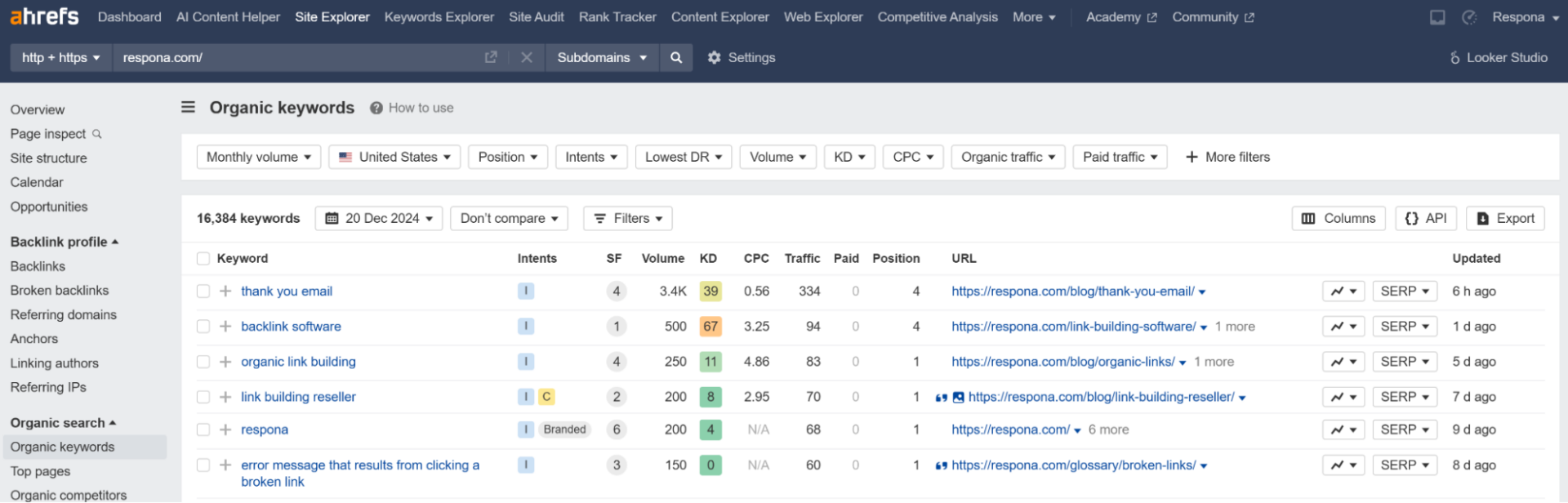
You’ll see all the keywords your site is currently ranking for along with a bunch of useful info:
- Keyword: The exact words people are searching for.
- Intent: The intent behind the search (informational, navigational, commercial or transactional).
- Position: Where you’re ranking for that keyword (e.g., #1, #5, #20).
- Volume: How many people search for that keyword each month.
- Traffic: How much organic traffic you’re getting from that keyword.
- KD (Keyword Difficulty): Ahrefs’ way of telling you how hard it is to rank for that keyword.
- URL: Which page on your website is ranking for that keyword.
This kind of keyword tracking helps you understand which tracked keyword terms are gaining traction and which ones may need further optimization.
You can also check your competitors’ keyword position the same way as part of your SEO competitor analysis.
Organic Traffic
So, you’ve got your keyword rankings, but these metrics mean nothing in a vacuum.
What does ranking high actually mean for your business as a whole?
The next step of answering this question is to check your organic traffic.
Organic traffic is one of the clearest indicators of whether your ranking improvements are translating into real search engine visibility.
The best tool for checking organic traffic is none other than Google Search Console.
It’s straight from the source.
For most websites, Google Search Console is the best starting point for tracking SEO ranking trends, impressions, clicks, and keyword performance.
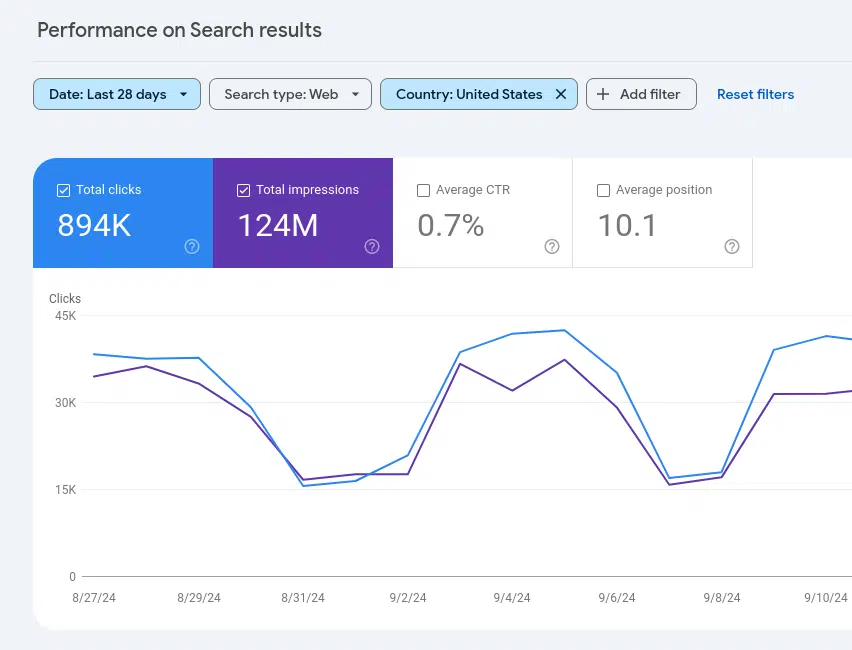
Google Search Console pulls its data directly from Google’s search index, so you’re getting the most accurate and reliable information about your organic traffic.
No estimations, no third-party guesswork – just pure, unfiltered SEO data.
Look for “Performance” in the left-hand menu and click on it.
By default, the Performance report shows you “Total clicks,” which represents the total number of times users clicked on your website’s links in Google search results. This is your primary indicator of organic traffic.
Search Console also helps you review keyword rank changes across pages, queries, and search results without needing separate rank tracking software right away.
You can adjust the date range at the top of the report (e.g., last 7 days, last 28 days, last 3 months, or a custom range).
Make sure the “Search type” filter is set to “Web.”
This ensures you’re only seeing organic traffic from Google web searches and not other search types like image or video search.
The Performance report also gives you valuable insights by breaking down your traffic by:
- Queries
- Pages
- Countries
Impressions
In addition to traffic, we also recommend tracking impressions.
Impressions refer to all people that saw your page in search result pages, but didn’t click on it.
You need to know your impressions number to calculate click-through-rates (CTR).
Even though google calculates it for you, it’s worth keeping an eye on impressions as percentages (which CTR is displayed in) on their own don’t mean anything.
Tracking impressions in Google Search Console is super easy, as it’s already included in the Performance report we just talked about.
Click-Through Rate
The real power comes when you look at impressions together with clicks.
CTR is especially useful because it tells you whether your current ranking is actually earning clicks from the search result page.
Google Search Console automatically calculates your Click-Through Rate (CTR), which is the percentage of impressions that resulted in clicks.
This is shown as “Average CTR” in the same area where you selected “Total impressions.”
By comparing impressions and clicks, you can get a better understanding of how well your search snippets (title tags and meta descriptions) are performing in attracting clicks.
If you have lots of impressions but a low CTR, it might be a sign that you need to improve your snippets to make them more compelling.
Time on Page and Bounce Rate
So, you know exactly how many people end up on your site.
These engagement metrics don’t directly affect ranking in the same way as keyword positions, but they do help you evaluate content quality and overall SEO performance.
Now what?
Now, it’s time to see if they find your content relevant.
For this, we use two metrics: the creatively-titled Time on Page, and Bounce Rate.
The latter measures the number of people who left your site (or “bounced”) after viewing only one page.
Ideally, you want to guide your visitors to product/service/pricing pages, so from page to page, so a high bounce rate means you’re not doing it well enough.
And a low time on page means they found your page irrelevant to your search, or the user experience is lacking in any other way – such as poor optimization, overwhelming design, etc.
The best place to track Time on Page and Bounce Rate is Google Analytics.
Head over to your Google Analytics account.
In the left-hand menu, under “Reports,” find the “Behavior” section.
The “Overview” report within the “Behavior” section gives you a quick snapshot of your overall bounce rate. This is a good starting point for understanding your site’s overall performance.
For more detailed information about Time on Page and Bounce Rate for individual pages, click on “Site Content” and then “All Pages.”
In the “All Pages” report, you’ll see a table listing all the pages on your website along with key metrics, including:
- Pageviews: The total number of times a page was viewed.
- Avg. Time on Page: The average amount of time users spent on that page.
- Bounce Rate: The percentage of visitors who left your website after viewing only that page.
Conversion Rate
Last but not least, you want users to interact with your site – sign up to your newsletter, read another post, or better yet: make a purchase.
If rankings bring visitors but those users never convert, your SEO effort may be improving visibility without delivering business value.
Conversion rate refers to the percentage of users who have taken a desired action – which can be any one of those things and more.
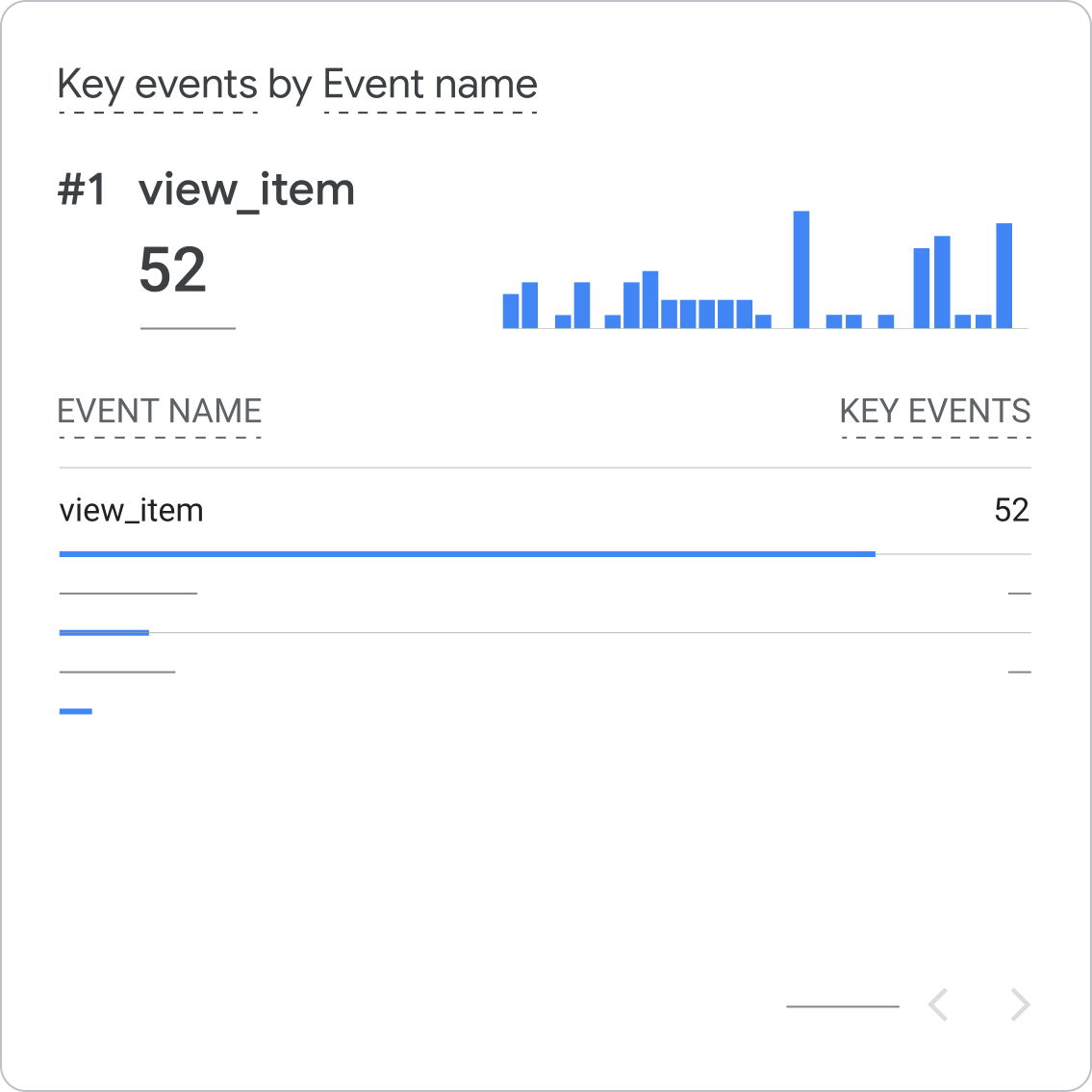
Because of this variability, tracking this SEO metric can be a little bit more challenging.
Here’s how to track it in Google Analytics:
- Go to your Google Analytics account.
- Go to “Admin”: In the bottom left corner, click on “Admin” (the gear icon).
- Select the correct Account, Property, and View.
- Make sure you’ve selected the correct account, property (your website), and view (usually “All Web Site Data”).
- Click on “Goals”: In the “View” column, click on “Goals.”
- Click “+ NEW GOAL”: This will start the process of creating a new goal.
You can choose from several pre-defined goal templates (like “Revenue,” “Acquisition,” “Inquiry,” and “Engagement”) or create a “Custom” goal.
If one of the templates fits your needs, it’s often the easiest option.
Give your goal a descriptive name (e.g., “Newsletter Signup,” “Product Purchase”) and choose the goal type. The most common types are:
- Destination: This is used when a specific page view signifies a conversion (e.g., a “Thank You” page after a purchase).
- Duration: This tracks how long users spend on your site.
- Pages/Screens per session: This tracks how many pages users view per session.
- Event: This tracks specific actions users take on your site, like clicking a button or playing a video. This is the most flexible option.
The specific details you need to configure will depend on the goal type you chose. For a “Destination” goal, you’ll enter the URL of the destination page.
For an “Event” goal, you’ll need to set up event tracking in your website’s code or using Google Tag Manager.
Google Analytics provides a “Verify this Goal” option that lets you see the conversion rate based on past data. This helps you ensure your goal is configured correctly.
Once you’ve configured and verified your goal, click “Save.”
3 SEO Rank Tracker Tools
Which rank tracker tool is the best?
The best rank tracker is the one that gives you reliable ranking data and helps you act on it.
Any tool that gets its data closest to Google.
At the moment of writing this article, Google Analytics does not provide data for some metrics (such as in-depth backlink data) that some third-party tools offer freely.
As for comprehensive SEO audit tools, the three giants are: Ahrefs, Semrush, and Moz.
We’ve only used two of these for tracking SEO performance, so that’s what we’re going to recommend.
If you’re comparing options, other names you may come across include Moz Pro, Advanced Web Ranking, Pro Rank Tracker, and other dedicated position tracking tools.
Google Analytics/Google Search Console

These are your free, essential tools straight from Google.
They provide the most accurate data about your website’s performance in Google search and how users interact with your site.
Google Analytics tracks things like pageviews, time on page, bounce rate, and conversions, giving you insights into how users are engaging with your content.
Google Search Console shows you things like search visibility, clicks, indexing issues, and other technical SEO problems.
It can also help bring up issues tied to Core Web Vitals, crawlability, and other technical SEO factors that affect visibility.
It’s essential for identifying and fixing issues that might be preventing your site from ranking well.
Ahrefs
Ahrefs is a powerful, all-in-one SEO toolset that excels in backlink analysis, keyword research, and competitor analysis.
It’s also a strong SEO rank tracker for monitoring keyword performance and spotting ranking opportunities across your site.
It’s a great choice for in-depth SEO audits and understanding your competitive landscape.
Key features:
- Site Explorer: Analyze backlinks, organic traffic, and paid traffic for any website.
- Keywords Explorer: Research keywords, analyze search volume, and identify keyword opportunities.
- Site Audit: Identify technical SEO issues on your website.
- Rank Tracker: Monitor your keyword rankings over time.
Semrush
Semrush is another comprehensive SEO toolkit that offers similar features to Ahrefs, including keyword research, rank tracking, site audits, and competitor analysis.
For teams managing keyword research, local SEO, and broader campaign reporting, Semrush can be a strong all-in-one tool.
It also provides tools for content marketing, social media management, and paid advertising.
Key features:
- SEO Toolkit: Conduct keyword tracking, do research, perform site audits, and analyze backlinks.
- Advertising Toolkit: Analyze competitor advertising strategies and manage your own campaigns.
- Content Marketing Toolkit: Research topics, analyze content performance, and track brand mentions.
- Competitive Research Toolkit: Analyze competitor traffic, keywords, and advertising strategies.
Both Ahrefs and Semrush are excellent tools, and the best choice for you may depend on your specific needs and preferences.
Many SEO professionals find value in using both!
Link building cheat sheet
Now Over to You
In conclusion, tracking SEO rankings means looking beyond a single Google ranking and measuring how your visibility in search results connects to traffic, engagement, and conversions.
For most teams, Google Search Console and Google Analytics are the foundation of effective SEO tracking, while tools like Ahrefs and Semrush add deeper rank tracking, keyword research, and competitive insights.
And if your goal is not just to track rankings, but to improve them with better backlinks, that’s where expert support can make a difference.
Check out our done-for-you link building. We handle prospecting, outreach, and relationship building to secure high-quality backlinks that strengthen your SEO strategy, improve authority, and help you rank higher over time.
Frequently Asked Questions (FAQ)
How often should I check my keyword rankings?
No, tracking only keyword rankings gives you an incomplete picture. To understand your SEO performance, you should also monitor organic traffic, impressions, click-through rate, time on page, bounce rate, and conversions. Rank tracking is useful, but it only tells part of the story.
Is it enough to just track keyword rankings?
No, tracking only keyword rankings provides a limited view of your SEO results.
It’s crucial to also monitor other metrics like organic traffic, impressions, click-through rate, time on page, bounce rate, and conversions to understand the full picture of how your SEO effort is impacting your business.
What’s the difference between impressions and clicks?
Impressions are the number of times your website appears in search results, while clicks are the number of times users actually click on your website’s link in those results.
A high number of impressions with a low number of clicks suggests your search snippet (title and description) needs improvement.
Why is my website ranking for keywords I didn’t target?
This can happen because Google’s algorithms consider various factors beyond the exact keywords you target, including related terms, synonyms, and the overall context of your content.
This can be a good opportunity to discover new SEO keyword opportunities.
Which SEO ranking tool is best?
Google Search Console is the most accurate source for organic performance data because it comes directly from Google.
However, tools like Ahrefs, Semrush, and other SEO rank tracker platforms can give you deeper keyword tracking, competitor insights, and broader ranking data that Google alone does not provide.