
Most people set their URL structure once and never touch it again. And for the most part, that’s fine. But there are a handful of things you want to get right the first time, because cleaning them up later is a pain.
This is a short, practical list of URL structure best practices, no filler. Just the things that actually matter for SEO and the stuff you’d want to know before publishing a new page.
Let’s get into it.
Key Takeaways:
- A clean URL structure helps both search engines and users understand what a page is about before they even click.
- The best SEO URL structure is short, lowercase, hyphenated, and contains your target keyword once.
- Avoid stop words, dates, parameters you don’t need, and any character that isn’t a hyphen.
- Always use HTTPS, set canonical tags when you have to use URL parameters, and watch out for redirects and orphaned pages.
- Run a site audit regularly. Most URL problems are silent. You usually only notice them once rankings drop.
- Does URL Structure Even Affect SEO?
- 1. Less is More
- 2. Use Hyphens
- 3. Only Use Lowercase
- 4. Avoid Keyword Stuffing
- 5. Switch to HTTPS (If You Haven’t Already)
- 6. Take it Easy with Parameters
- 7. Avoid Redirects
- 8. Check for Orphaned Pages
- 9. Regularly Run a Site Audit
- Now Over to You
- Frequently Asked Questions (FAQ)
Link building cheat sheet
Does URL Structure Even Affect SEO?
Yes. Your URL is one of the first things Google reads about a page, and if it includes your target keyword, that’s an immediate signal about what the content is.
URLs also let you categorize pages in a way that makes the whole site easier to parse, both for search engines and for actual humans.
Take this one:
respona.com/blog/url-structure-for-seo
You already know a few things without ever loading the page. It’s a blog post. It’s about URL structure for SEO. It lives under the blog category, which means it’s probably one of many similar posts.
Now compare it to this:
Same domain name, completely different signal. You know this is a case study, and you even know which client it’s about.
That’s the whole point. A well structured URL communicates context before anyone clicks. Google uses that context to figure out where a web page fits in your site and how it relates to everything else you publish. Users use it to decide whether the result is worth their time.
The simpler your URLs, the easier this gets for everyone. And easier almost always translates to better rankings in the search results.
1. Less is More
This is the single biggest URL structure best practice. In your URLs, the only things you actually need are:
- Your domain name, which is going to be there anyway.
- The category of the page (unless it’s a landing page, which usually just sits at domain.com/landing-page).
- The target keyword of the page.
That’s it. Nothing else.
Dates, full sentences, author names, publish year, none of it belongs in a URL unless you’re covering a time-sensitive topic or a question keyword where the whole phrase actually matters.
Stop words also need to go. “The,” “a,” “of,” “for,” “to,” cut them all. Shorter URLs are easier to read, easier to share, and easier for search engines to parse.
So instead of:
respona.com/blog/2024/the-best-guide-to-writing-a-great-url-for-your-website
You want:
respona.com/blog/url-structure-for-seo
Same content, fraction of the length. Clean URLs like this consistently outperform bloated ones, and they’re a lot less embarrassing to paste into a Slack thread.
2. Use Hyphens
Always use hyphens to separate words in your URL path. Never underscores, never plus signs, never anything else.
A human can read url_structure_for_seo just fine. Search engines can’t, or at least, they don’t treat it the same way.
Google specifically treats hyphens as word separators and underscores as joiners, which means url_structure_for_seo reads to Google as one giant word: urlstructureforseo. Not great.
Hyphens are the standard. Stick to them.
3. Only Use Lowercase
To us, “A” and “a” are the same letter. To a server, they’re not.
That means respona.com/Blog/URL-Structure and respona.com/blog/url-structure can technically resolve as two completely different pages.
Which leads to all the usual problems: duplicate content, broken links from people who typed it differently, multiple URLs competing for the same keyword, and search engines getting confused about which version to rank.
Just keep everything lowercase. Set it as a default rule in your CMS if you can, and you’ll never have to think about it again.
4. Avoid Keyword Stuffing
Use your target keyword once in the URL. That’s it.
You don’t need synonyms, you don’t need supporting keywords, you don’t need to cram in three variations of the same phrase.
That’s what the actual content on the page is for.
Something like respona.com/blog/url-structure-seo-url-best-practices-guide doesn’t help you rank better.
If anything, it looks spammy and gives Google a reason to second-guess what the page is actually about. Pick the cleanest version of your keyword and move on.
5. Switch to HTTPS (If You Haven’t Already)
Google has openly favored HTTPS over plain HTTP urls as a ranking signal for years now. The reason is simple: HTTPS is secure, HTTP isn’t.
If your site is still on HTTP, that’s the first thing to fix. Browsers actively warn users away from non-secure sites at this point, and you’re leaving an easy ranking signal on the table for no reason.
Most hosts offer a free SSL certificate through Let’s Encrypt, so there’s not much of an excuse.

After the switch, do a quick check in Google Search to make sure the HTTPS version is the one being indexed, and set up 301 redirects from the old HTTP URLs so you don’t lose any existing link equity.
6. Take it Easy with Parameters
URL parameters are the stuff that gets appended to a URL after a ?. If you run an ecommerce site, you’ve seen them every time someone applies a filter:
respona.com/shop?color=blue&size=large&sort=price
Same product page, but technically a different URL every time someone changes a filter. If you let search engines crawl all of those, you end up with a mess: dozens of dynamic URLs all pointing to essentially the same content, competing with each other for rankings.
The fix is canonical tags. Set a canonical URL on the main static URL of the page (respona.com/shop in this case), and every dynamic variation will tell Google “hey, the real version is over here.” Crawl budget stays clean, duplicate content stays out of the index, and ranking signals consolidate on the page you actually want to rank.
If you’re not running an ecommerce site, you probably don’t deal with this much. But the second you add filters, sort options, or tracking parameters like ?utm_source=, canonical urls become non-optional.
7. Avoid Redirects
Every redirect is a small tax on your site speed. One or two won’t hurt. A chain of them (URL A redirects to B, which redirects to C, which redirects to D) absolutely will.

Run a crawl in Ahrefs, Screaming Frog, or whatever tool you prefer, and look for two things:
- Redirect chains. Anywhere you’ve got more than one hop, flatten it. If A redirects to D, just point A straight at D and skip the middle steps.
- Internal links pointing to old URLs. When you redirect a page, the redirect itself works, but you’re still wasting load time every time someone clicks an internal link to the old URL. Update those links to point directly at the new destination.
This stuff piles up quietly over the years, especially if you’ve ever restructured your blog or migrated a site. Worth cleaning up once or twice a year.
8. Check for Orphaned Pages
An orphaned page is a web page on your site that nothing else links to.
No menu item, no internal link from a blog post, nothing. It exists, but there’s no path to get there unless someone has the exact URL.
Which means almost no one will. Google might still find it through your sitemap, but with zero internal links pointing at it, the page has basically no authority and ranks accordingly.
In WordPress, plugins like Yoast or Rank Math will flag orphaned content for you. Ahrefs and Screaming Frog can also surface them through a site crawl.

Either way, the fix is the same: find a couple of relevant pages on your site and add internal links pointing to the orphan.
9. Regularly Run a Site Audit
Everything I’ve talked about so far (redirects, orphaned pages, parameter messes, duplicate URLs, broken links) is invisible until you go looking for it. That’s what makes a regular site audit so important.
Ahrefs Site Audit, Screaming Frog, and Semrush all do this well. Google Search Console will also flag a lot of the basics for free, and Google Analytics is useful for spotting pages that suddenly tank in traffic, which is often the first sign of a problematic URL somewhere.
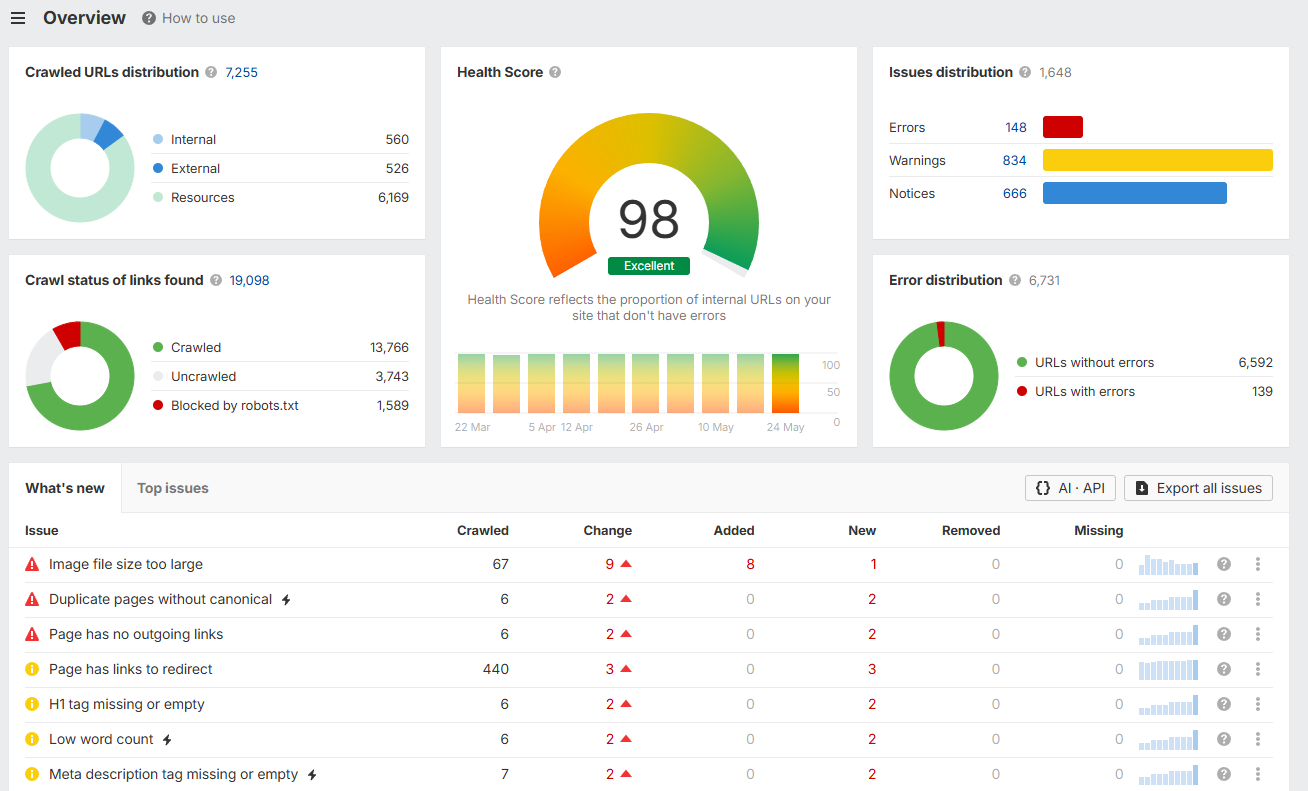
I run a full audit once a quarter. That’s enough to catch issues before they snowball, without turning it into a full-time job. The first audit on a site that’s never been checked is always the worst one. After that, it’s usually a couple of hours of cleanup every few months.
Set a recurring calendar reminder. Future you will thank present you.
Link building cheat sheet
Now Over to You
That’s the full list. None of these URL best practices are complicated on their own, but together they make a real difference in how search engines crawl, understand, and rank your pages.
The trick is to get the structure right from the start. Going back and fixing URLs on a live site is doable, but it’s a slog of redirects, broken links, and lost rankings if you’re not careful.
Set the rules once, enforce them in your CMS, and you’ll save yourself a lot of headaches down the line.
Once your URL structure is sorted, the next bottleneck in most SEO efforts is the same thing it’s always been: backlinks. You can have the cleanest site on the internet and still struggle to rank without them.
That’s where we come in. Respona offers done-for-you link building, where our team handles the prospecting, outreach, follow-ups, and negotiations for you. You pick the pages you want to promote, we go get the placements.
Place an order whenever you’re ready.
Frequently Asked Questions (FAQ)
Does URL structure really matter for SEO?
Yes. URL structure matters because it’s one of the first signals Google uses to understand what a page is about, and it directly affects search engine rankings. It’s a small piece of the overall search engine optimization puzzle, but it’s an easy win.
What does an SEO-friendly URL look like?
A good SEO friendly URL is short, lowercase, hyphenated, and contains the target keyword once. The cleanest seo url structure follows the pattern domain.com/category/target-keyword, with no dates, stop words, or extra parameters. A well structured URL like that tells both users and search engines exactly what the page is about.
What’s the difference between absolute and relative URLs?
An absolute URL includes the full path including the domain (https://respona.com/blog/url-structure-for-seo), while a relative URL only includes the part after the domain (/blog/url-structure-for-seo).
For internal links inside your site, either works, but absolute URLs are generally safer for things like canonical tags, sitemaps, and bare url links shared externally.
Dynamic vs static URLs, which is better for SEO?
A static URL is almost always better. They’re easier to read, easier to share, and don’t create the duplicate content issues that dynamic urls often do when filters and parameters get involved. If you have to use dynamic ones (ecommerce sites usually do), make sure canonical tags are in place.
How long should a URL be?
Shorter is better. There’s no hard character limit, but short urls consistently outperform long ones in search results because they’re easier to parse and more likely to get clicked. Keep your url path tight and only include what’s necessary.
What is URL optimization?
URL optimization is just the process of making sure your URLs follow the best practices covered in this article: clean, lowercase, hyphenated, descriptive, and keyword-focused. It’s one of the easier parts of seo optimization, since most of it is set-and-forget once you’ve got the rules in place.
Does Google PageRank still affect how URLs are ranked?
Google PageRank as a public metric is long gone, but the underlying concept (pages with more quality links pointing to them rank higher) is very much still alive. Your top level domain and domain name authority both feed into this, which is why backlinks matter as much as on-page SEO does.