
You should ONLY disavow links if your website has received a “manual” action from Google.
In other words, a penalty.
If this applies to you, keep reading.
If you never received a penalty, you should still keep reading to learn more about what “Disavow” even means in Google, instances in which you should or should NOT disavow backlinks, how to disavow links in 3 steps, and how to remove disavows
Let’s get started.
Key Takeaways:
- Most websites do not need to disavow links manually, because search engines are now good at ignoring spammy links automatically.
- You should usually only use the disavow tool if your site has received a manual action or Google penalty related to unnatural links.
- Disavowing the wrong links can hurt your SEO by removing legitimate quality backlinks from your backlink profile.

Link building cheat sheet
What Does “Disavow” Mean?
According to the dictionary, the word “disavow” means to refuse to take responsibility.
I think it’s a pretty accurate description – in terms of SEO, disavowing a link means telling Google “Hey, I never asked for this” with the goal of them removing it from your backlink index.
In SEO terms, disavowing links means telling a search engine that you do not want certain backlinks associated with your site.
By submitting a disavow file through Google’s disavow tool, you are asking Google to ignore specific harmful backlinks when evaluating your site’s rankings.
This process is done through the Google Disavow Tool, which is connected to your property in Google Search Console.
The tool allows website owners to upload a disavow list containing URLs or domains that should be excluded from ranking calculations.
But more links = more rankings, right? Why would you want to remove them from your profile?
Well, what would you think if one day you checked your links and found one of these?

Probably “What the hell?” – you never asked for it, and it’s coming from a random site.
However, in 2026, Google’s algorithm has become very good at spotting these and disavowing them automatically.
So, is it even worth the effort to manually disavow backlinks?
Do You Actually Need to Disavow Links?
No, you don’t actually need to disavow links manually – Google will do it for you.
In most cases, Google’s algorithms are already capable of ignoring low quality links, spam backlinks, and other suspicious signals. That means manual disavowing backlinks is only necessary when there is a serious issue with your backlink profile.
Unless your website has – or is probably going to – receive a manual action/penalty.
So, for example, if you have been buying a bunch of links from low-quality sites or using another black-hat link building method.
if your website has received a manual action in Google Search Console due to unnatural links, disavowing bad links may help remove the penalty and restore rankings.
Or, if you have already received one, disavowing all spammy links is one of the first steps to restore your rankings.
If your website has never gotten penalized, and you’re not taking part in any black-hat activities, disavowing links can actually hurt you rather than help, so you don’t usually have to worry about it.
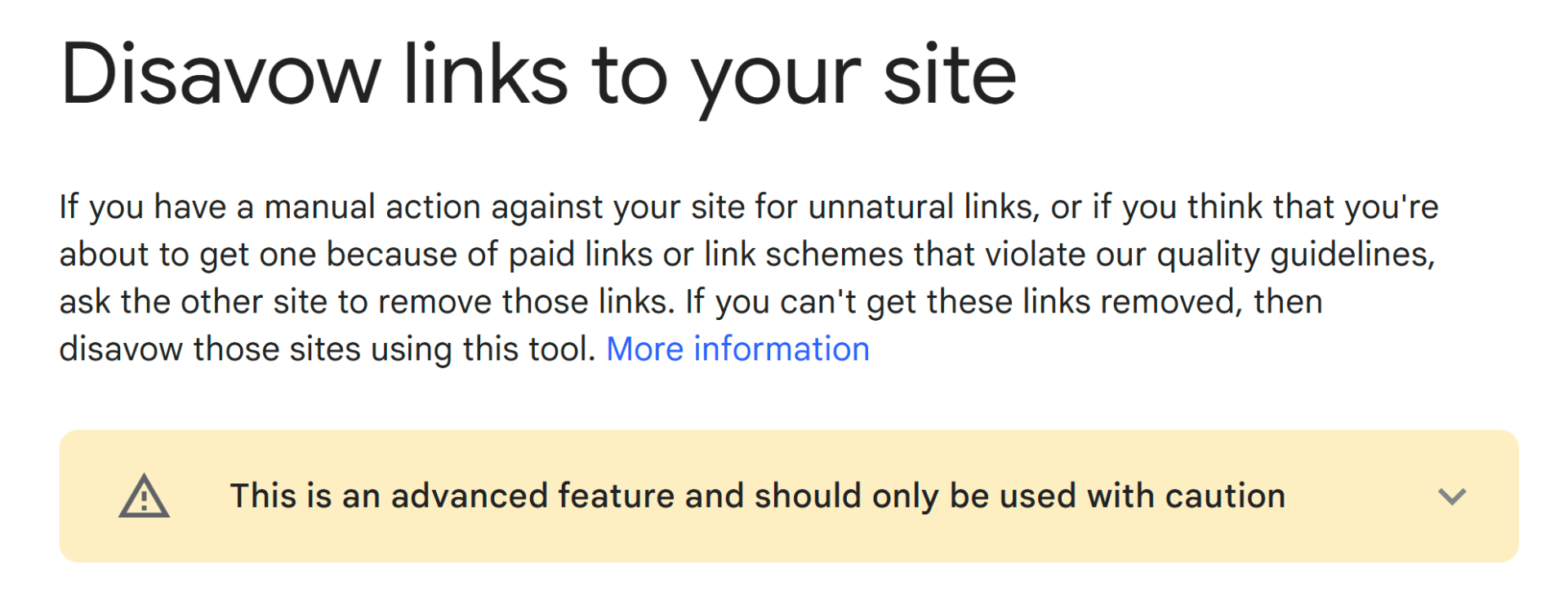
Even Google warns: “This is an advanced feature and should only be used with caution!”
For example, if you’ve been doing the occasional direct link exchange but otherwise your link profile is natural, don’t jump the gun in panic and disavow all “illegal” direct links from your partners.
Instead of making you safer, your list of requested disavows might actually do the complete opposite – and let Google know exactly which links were built as part of a “link scheme”.
Don’t shoot yourself in the foot.
Sites that participate in aggressive link building tactics, such as buying paid links or participating in a link scheme, may accumulate toxic backlinks that require manual cleanup.
The next section is for those of you looking to recover from a penalty, trying to dodge an incoming one, or victims of a negative SEO attack.
How to Disavow Backlinks in 3 Steps
Step 1: Find Toxic Backinks
The first step in learning how to disavow backlinks is identifying which links are actually harmful. A backlink audit using SEO tools can help you detect toxic backlinks, spammy links, or low quality links coming from suspicious domains.
If you got hit with a penalty for taking part in bad link schemes (such as paid links), you will need every single referring page’s URL.
If you want to do a backlink audit for toxic link presence (like gambling or adult sites), we recommend using a backlink checker like Ahrefs or Semrush.
Many SEO tools can help analyze link quality and identify potentially harmful backlinks. These tools can also reveal whether your backlink profile contains links from link farms, spam domains, or other questionable sources.
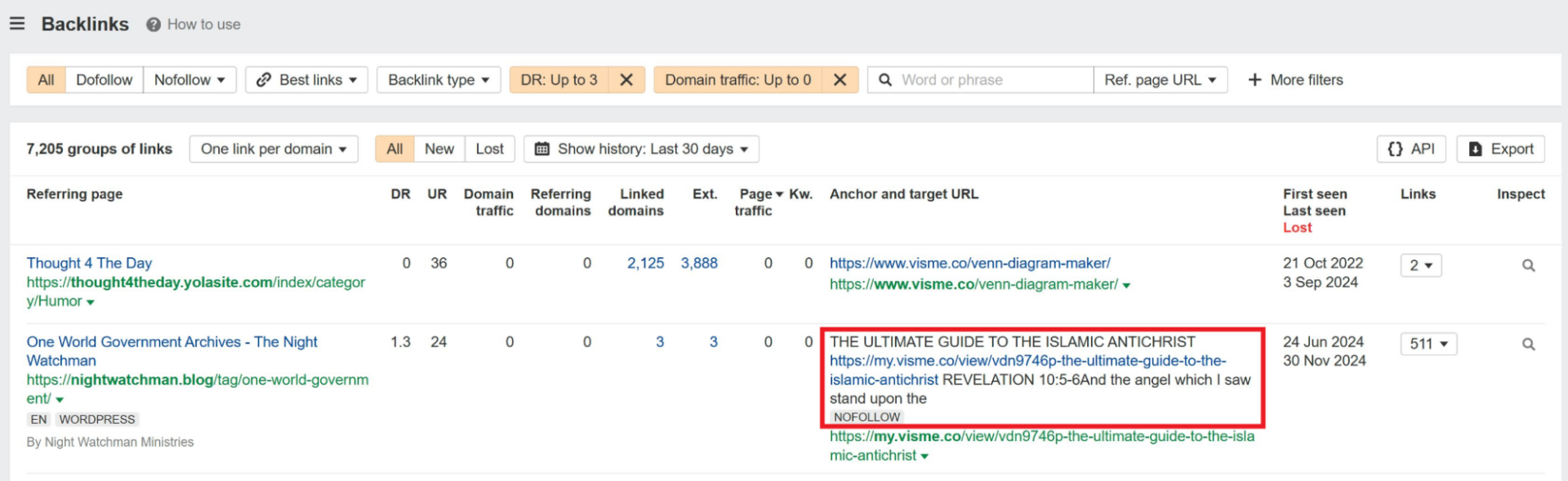
Put your website into the search bar, and navigate to Site Explorer > Backlinks.
You can use filters like domain traffic and domain rating to check for harmful backlinks.
Setting them to “up to 0” or a very low number will usually delight you with gems such as “The Ultimate Guide to The Islamic Antichrist” as the anchor text and a spammy link to your site.
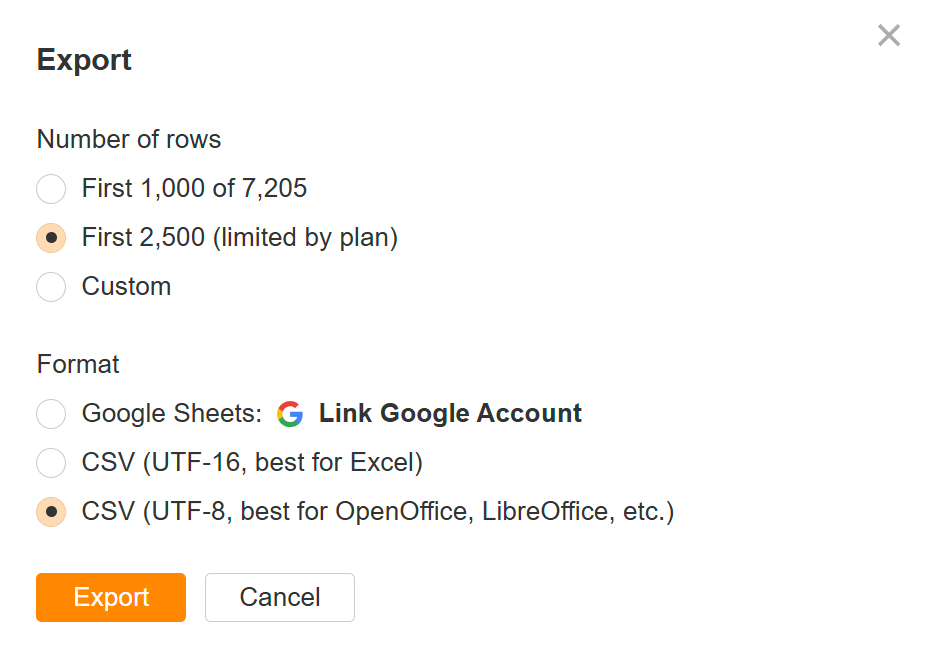
You can then either select links one-by-one or bulk export.
We recommending using the UTF-8 format you’ll need to create a UTF-8 TXT file later on.
Once you have identified harmful backlinks, you can begin compiling them into your disavow list.
Step 2: Put Them in a .txt File
Next, you’ll have to put every bad backlink you want to disavow into a text file encoded in either UTF-8 or 7-bit ASCII.
This text document is known as a disavow file, and it tells Google exactly which links should be ignored during ranking calculations. Each URL or domain included in the disavow file represents a link you want removed from your backlink profile’s influence.
It should look like this:
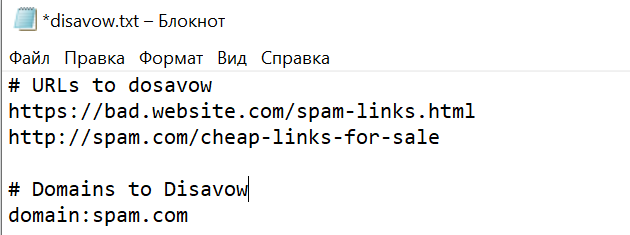
According to Google, the max URL length is 2048 characters, and the max file size is 100,000 rows and 2mb.
Your disavow list should only include genuinely harmful links, such as spammy backlinks, paid links that violate guidelines, or links coming from obvious link spam networks.
Rows starting with # will be ignored, so you can use them to leave comments or separate URLs from domains.
Once your list is ready, it’s time to move on to the final step.
Step 3: Upload Your List to Google
To upload your disavow file, you need access to your property in Google Search Console.
The disavow tool is separate from the main Search Console interface but is still connected to your verified website.
If you already have a previous disavow file, you’ll see it here.
Click “Replace” (or “Upload” if this is your first disavow file) and select your new file from computer storage. Note: You must be the property owner to upload a disavow file.
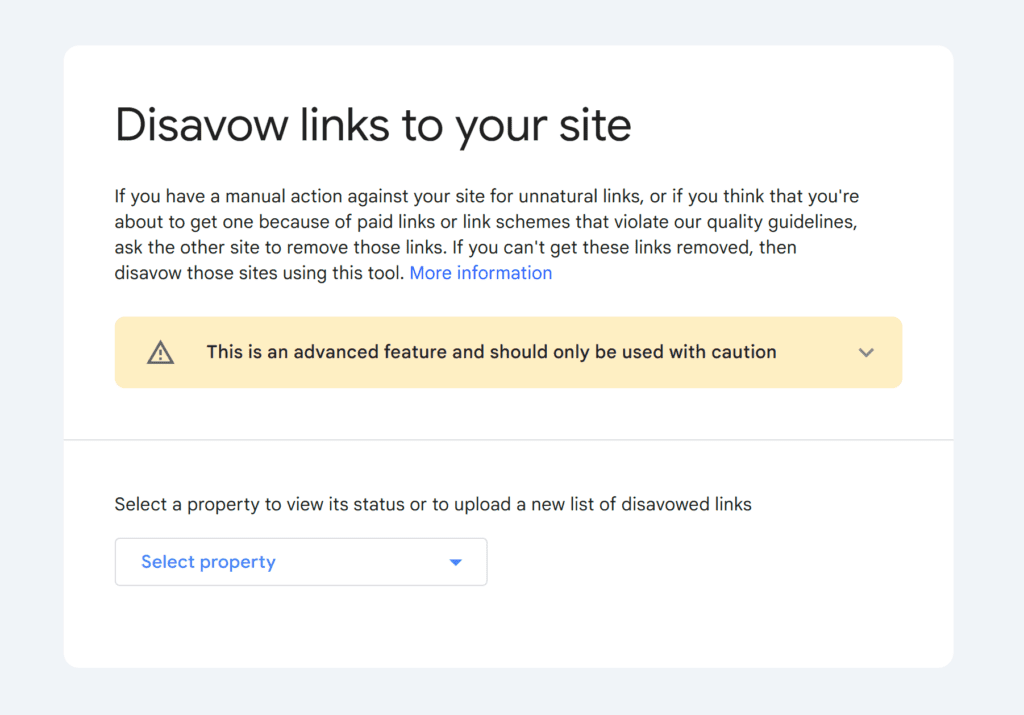
If your list is formatted incorrectly or has any errors, you’ll see them here as well.
Once uploaded, the Google disavow links tool will process your disavow file the next time the search engine crawls and evaluates the affected pages.
How to Remove Disavowals?
If you mistakenly disavowed legitimate quality links, you can edit or remove entries from your disavow file and upload the revised version again through the disavow tool.
To remove disavowals, simply go to the Google disavow tool, select your property, and click “Cancel Disavowals”.
Link building cheat sheet
Now Over to You
Remember: disavowing links should only be done when your website has received a manual action or is clearly affected by harmful backlinks, spam backlinks, or other forms of link spam.
For most websites, focusing on building quality backlinks is far more important than worrying about every spammy link that appears in your backlink profile.
A strong link building strategy built around high-quality content, relevant partnerships, and authority websites will do far more for your rankings than constantly cleaning up bad links.
If you want to grow your backlink profile without dealing with toxic links, spammy backlinks, or risky tactics, our team can help.
Our done-for-you link building helps brands earn high-quality backlinks through personalized outreach, digital PR, and relationship-driven link building campaigns.
Instead of managing prospecting, outreach, and follow-ups yourself, you can rely on our team to build links that strengthen your SEO performance and increase organic traffic.
Frequently Asked Questions (FAQ)
When should I use the disavow tool?
You should only use the disavow links tool if your site has received a manual action in Google Search Console due to unnatural links or a link scheme. In most other cases, search engines automatically ignore spammy backlinks.
What file format should my disavow list be in?
Your disavow list must be a plain text (.txt) file encoded in UTF-8 or 7-bit ASCII.
Each URL or domain you want to disavow should be on a separate line. You can use “#” to add comments within the file.
How long does it take for Google to process a disavow file?
After uploading your disavow file through the Google disavow tool, it can take several weeks for Google to crawl the affected pages and apply the changes to your rankings.s.
There’s no guaranteed timeframe, as it depends on Google’s crawling and re-indexing schedule.
What’s the difference between disavowing spammy backlinks and a domain?
Disavowing a URL tells Google to ignore a specific page’s link to your site.
Disavowing a domain tells Google to ignore all links from that entire website to your site.
It’s generally recommended to disavow domains only if there are a large number of bad links from that site.
Can disavowing links hurt my website?
Yes. If you accidentally disavow legitimate quality backlinks or remove useful links from your backlink profile, it can negatively impact rankings.