A few years ago, I would have said that seo monitoring is hard.
Now, I realized that the problem was: seo monitoring tools simply provide way too many metrics for a beginner to make sense of.
And most of them are only useful in very specific scenarios.
In reality, you only need a handful of them to monitor regularly.
In this article, I will share my favorite search engine monitoring tools, and how to track the only metrics that really matter.
Let’s get started.

Link building cheat sheet
What is Search Engine Monitoring?
Search engine monitoring is – you guessed it, the process of tracking how your website performs in search engine results.
In simple words, it’s about measuring your visibility and ranking on Google and other platforms.
Without it, you’re basically guessing it. Which is a waste of time if you actually want toimprove your search engine optimization and rank higher.
Only by regularly auditing your site metrics can you build a sensible SEO strategy and actually outrank your competitors.
To do it, you’ll need a couple of search engine monitoring tools.
Which leads me to my next section.
Search Engine Monitoring Tools
When you Google “seo monitoring tool”, you’ll get dozens of different softwares advertised to you.
On the surface, most of them offer the same features. But once you try them out, you’ll see that the reports they provide are vastly different.
This is because every third-party (non-Google) tool has its own data sources, which is why you may see completely different numbers when you check a seemingly straightforward metric like organic traffic.
The only reporting tools that provide 100% accurate metrics are Google’s own Analytics and Search Console.
So the answer is simple, right?
Just use GA and GSC? Not really.
They don’t provide in-depth backlink reports, and they cannot be used for competitor research.
Both of which are vital pillars of search engine optimization.
I personally recommend that in addition to Google Analytics and Search Console, you pick a single well-known rank tracker like Ahrefs, Semrush, or Moz.
Yes, they can be expensive. But the quality of their data cannot be compared to a cheaper, alternative option that nobody has heard of before.
Let’s dive a little deeper into each one and what they’re useful for.
Google Analytics
If you’re serious about SEO monitoring, Google Analytics is non-negotiable.
It’s the tool that shows you what actually happens after people land on your site. Rankings bring users in, but Google Analytics tells you whether that traffic engages, converts, or leaves right away.
Key features
Google Analytics (GA4) focuses on user behavior rather thansearch engine ranking. Its most useful features include:
- Traffic acquisition reports that show where users come from
- Page-level performance tracking
- Event and conversion tracking
- Audience insights such as location and device
- Real-time reporting
In simple terms, it answers one question. What do users do once they land on my site?
What metrics you can track
With Google Analytics, you can monitor:
- Organic traffic from search
- Top organic landing pages
- Engagement rate and bounce rate
- Time on page
- Conversions from organic search
- Assisted conversions
- Device and location breakdowns
- Traffic trends over time
These metrics help you identify which content deserves more attention and which ones quietly underperform.
Price
Google Analytics is completely free.
There is a paid enterprise version called Google Analytics 360, but most websites will never need it.
Pros
- Free and backed by Google
- Highly accurate traffic and engagement data
- Essential for measuring SEO results
- Integrates well with Search Console
Cons
- No keyword ranking data
- No backlink or competitor analysis
- GA4 has a learning curve for beginners
- Limited SEO insights without pairing it with other tools
Bottom line: Google Analytics will not tell you how you rank. It will tell you whether your SEO efforts actually work, which makes it the foundation of any search engine monitoring setup.
Google Search Console
If Google Analytics shows you what happens after the click, Google Search Console shows you everything that happens before it.
It is the only tool that gives you direct data from Google about how your site appears in search results. No estimates, no third-party models, just raw seo performance data.
Key features
Google Search Console focuses on search visibility and technical health. Its most important features include:
- Search performance reports for queries and pages
- Indexing and coverage reports
- Core Web Vitals and page experience insights
- Manual actions and security issue alerts
- URL inspection for individual pages
This is the tool you use to understand how Google sees your site and tracks ai visibility through AI Overviews.
What metrics you can track
With Google Search Console, you can monitor:
- Organic impressions
- Clicks from search results
- Click-through rate (CTR)
- Average position for queries and pages
- Indexed and excluded pages
- Crawl and indexing issues
- Core Web Vitals performance
- Performance in ai search features
These metrics help you diagnose visibility problems and spot opportunities where rankings exist but clicks do not.
Price
Google Search Console is completely free.
There is no paid version.
Pros
- Data comes directly from Google
- Essential for monitoring search visibility
- Excellent for SEO audits and finding indexing issues
- Complements Google Analytics perfectly
Cons
- No conversion or revenue tracking
- Limited historical data
- No competitor insights
- Interface can feel overwhelming at first
Bottom line: Google Search Console tells you how visible your site is in Google search and why. If you are not using it, you are missing half of the search engine monitoring picture.
Ahrefs

Ahrefs is the tool you use when you want to understand how competitive your SEO landscape really is.
While Google tools focus on your own site, Ahrefs lets you see what your competitors are doing, how they are ranking, and why they are outranking you.
Key features
Ahrefs is best known for its massive backlink database, but it goes far beyond links. Its core features include:
- Keyword research and difficulty analysis
- Rank tracking for keywords and pages
- Backlink and referring domain analysis
- Content gap and competitor research
- Site audit for technical SEO issues
It is the tool that answers the question. Why is my competitor ranking above me?
What metrics you can track
With Ahrefs, you can monitor:
- Keyword rankings and ranking changes
- Organic traffic estimates
- Referring domains and backlinks
- Link velocity
- Domain Rating and URL Rating
- Top-ranking pages by keyword
- Keyword gaps compared to competitors
These metrics help you prioritize content marketing and link building based on real competitive data.
Price
Plans start at $129 per month, with higher tiers for larger sites and teams.
Pros
- Best-in-class backlink data
- Excellent competitor and keyword research
- Clean interface with powerful reports
- Reliable rank tracking for ongoing monitoring
Cons
- No free plan
- Can be expensive for beginners
- Traffic numbers are estimates, not exact data
- Limited integration with Google Analytics
Bottom line: Ahrefs does not replace Google Analytics or Search Console. It complements them by showing you the competitive and link-based side of search engine monitoring that Google tools simply do not provide.
Semrush
Semrush is the most all-in-one SEO tool on this list.
If Ahrefs is best known for backlinks, Semrush stands out for keyword rank tracking, SERP analysis, and ongoing SEO monitoring at scale.
Key features
Semrush is built for continuous monitoring rather than one off analysis. Its core features include:
- Keyword research and rank tracking
- Position tracking with daily updates
- SERP feature tracking including ai visibility
- Site audits for technical SEO
- Competitor analysis across search, content, and links
It is especially useful if you want to keep a close eye on SEO changes over time.
What metrics you can track
With Semrush, you can monitor:
- Keyword rankings and ranking volatility
- Visibility and share of voice
- Organic traffic estimates
- SERP feature ownership
- Competitor ranking gains and losses
- Backlinks and referring domains
- Site health and technical issue trends
These metrics make it easier to spot trends and react quickly when seo changes occur.
Price
Plans start at $199 per month, with higher tiers for teams and agencies.
Pros
- Excellent rank tracking and SERP monitoring
- Strong competitor research features
- Wide range of tools for SEO content
- Useful alerts for sudden changes
Cons
- Can feel overwhelming for beginners
- Traffic data is estimated, not exact
- Higher price point than some alternatives
- Interface can be cluttered at times
Bottom line: Semrush is ideal if you want a single platform to monitor rankings, competitors, and technical SEO on an ongoing basis, without juggling too many separate tools.
Moz
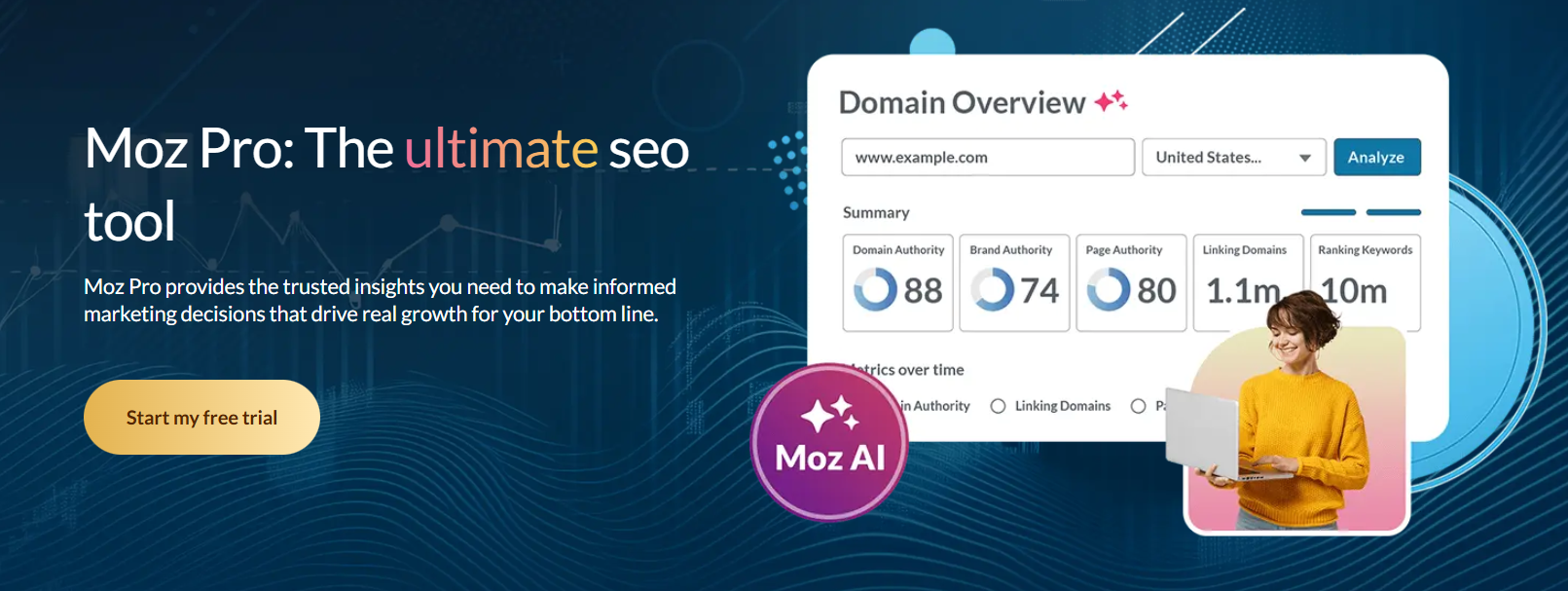
Moz is the simplest and most beginner friendly SEO tool on this list.
If Ahrefs and Semrush feel overwhelming, Moz offers a more approachable way to monitor your search performance without drowning in data.
Key features
Moz focuses on the fundamentals of SEO and keeps its feature set intentionally lightweight. Its main features include:
- Keyword research and tracking
- Domain Authority and Page Authority metrics
- Backlink and referring domain analysis
- On-page SEO recommendations
- Site crawl and basic technical audits
It is designed for clarity rather than depth.
What metrics you can track
With Moz, you can monitor:
- Keyword rankings
- Domain Authority and Page Authority
- Referring domains and backlinks
- Link growth over time
- On page optimization issues
- Basic site health signals
These metrics are enough for small sites and teams that want visibility without complexity.
Price
Moz is a paid tool.
Plans start at $49 per month, with higher tiers for larger sites and more tracked keywords.
Pros
- Very beginner friendly interface
- Clear and easy to understand metrics
- Strong authority metrics for benchmarking
- Good educational resources
Cons
- Smaller backlink database than Ahrefs
- Less detailed competitor research
- Slower data updates
- Limited advanced SEO features
Bottom line: Moz is a solid choice if you want straightforward search engine monitoring and clear benchmarks, without the steep learning curve of more advanced SEO tools. It’s also compatible with webmaster tools data.
ChatGPT
Okay, hear me out.
ChatGPT is not a search engine monitoring tool. It’s a language model that on its own is unusable for SEO.
But what it can do is help you make sense of your SEO report exports from other tools.
Those are overwhelming, especially when you’re looking at hundreds of pages’ metrics. It’s hard to see what exactly is wrong and come to a decision on what to do about it.
ChatGPT can help with that. It can analyze your reports for you and provide tips on how to improve your SEO based on that data.
Also, it can connect to many actual SEO tools like Ahrefs’ MCP server. In that case, it will pull real SEO data into ChatGPT and become really useful, even helping with ai search optimization.
I actually use ChatGPT for the initial stage of keyword research. It’s surprisingly good at proposing topics and keywords you wouldn’t have thought of yourself.
The Most Important Search Engine Monitoring Metrics
Now with the toolset out of the way, let’s talk about the metrics you actually need to track.
No fluff, no vanity metrics, just the stuff that matters for improving visibility and tracking seo rankings every day, not once a year.
Organic Traffic
Organic traffic shows how many people land on your site from unpaid search results.
If SEO is working, this number should grow over time. If it is not, something is broken.
Organic traffic counts users and sessions that come from Google. It reflects the result of your SEO efforts, not the cause behind them.
Where to measure it
You can find the most accurate organic traffic report in:
- Google Analytics, for accurate traffic data
- Google Search Console, to confirm trends and diagnose drops
Avoid relying on third party traffic estimates for your own site.
How to find the report
In Google Analytics (GA4):
Reports → Acquisition → Traffic acquisition → filter by Organic Search
In Google Search Console:
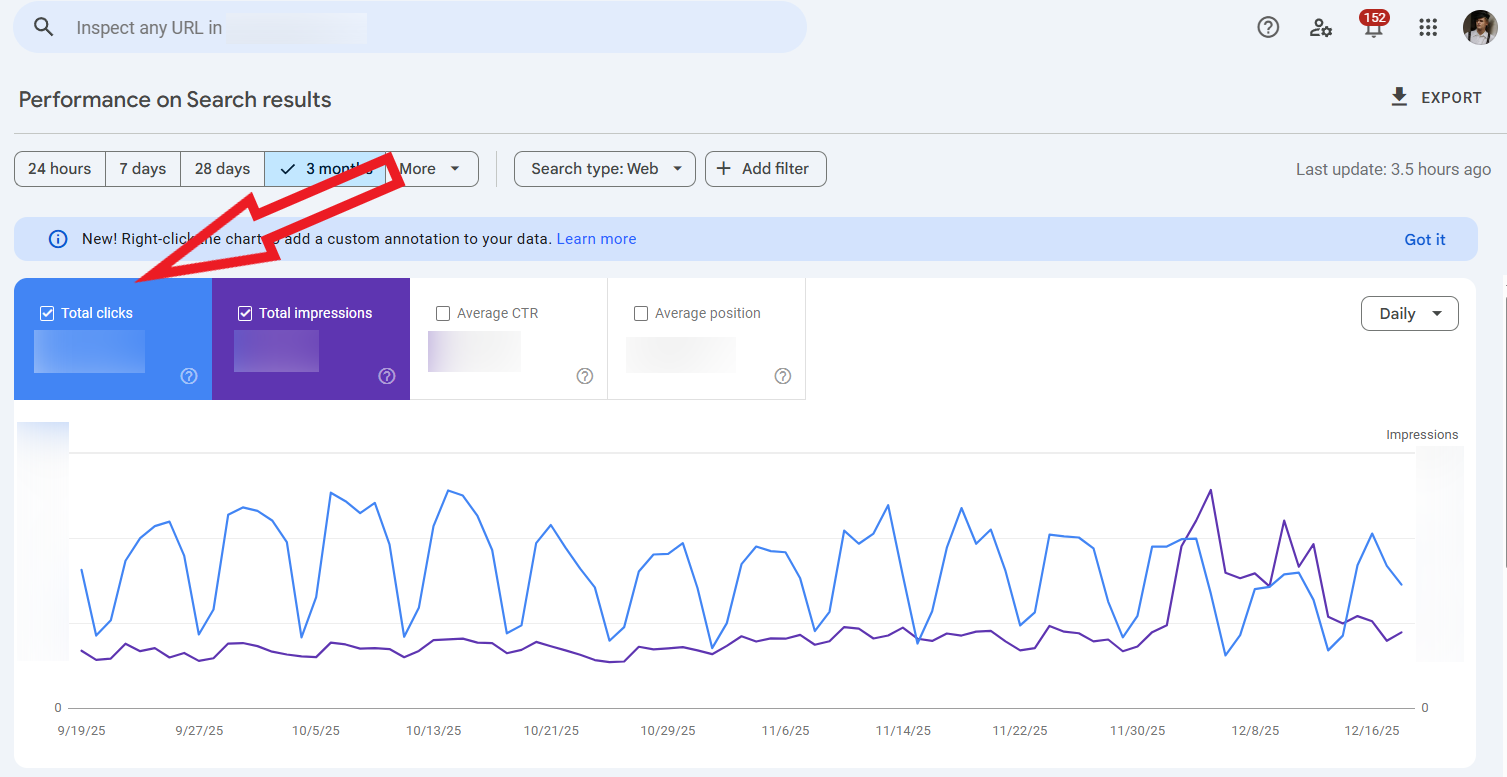
Performance → Search results → check total clicks
What low organic traffic means and how to fix it
Low organic traffic usually means low rankings, poor CTR, or weak content relevance.
- Update and improve pages that already rank
- Expand content around keywords you partially rank for
Page Rankings
Page, or keyword rankings are the specific position where your pages are showing up on Google.
The goal is to always try to get to #1, or get captured by an AI overview, aka “position zero”, which requires strong ai visibility.
Ranking in the top three usually drives most clicks, while anything beyond page one rarely gets meaningful traffic.
Rankings change often, so your average position matters more than daily fluctuations.
Where to measure it
You can track page rankings in:
- Google Search Console, for average position data
- Ahrefs, Semrush, or Moz, for dedicated rank tracker features and history
Google tools show what happened. Third party rank tracker tools help you monitor changes over time.
How to find the report
In Google Search Console:
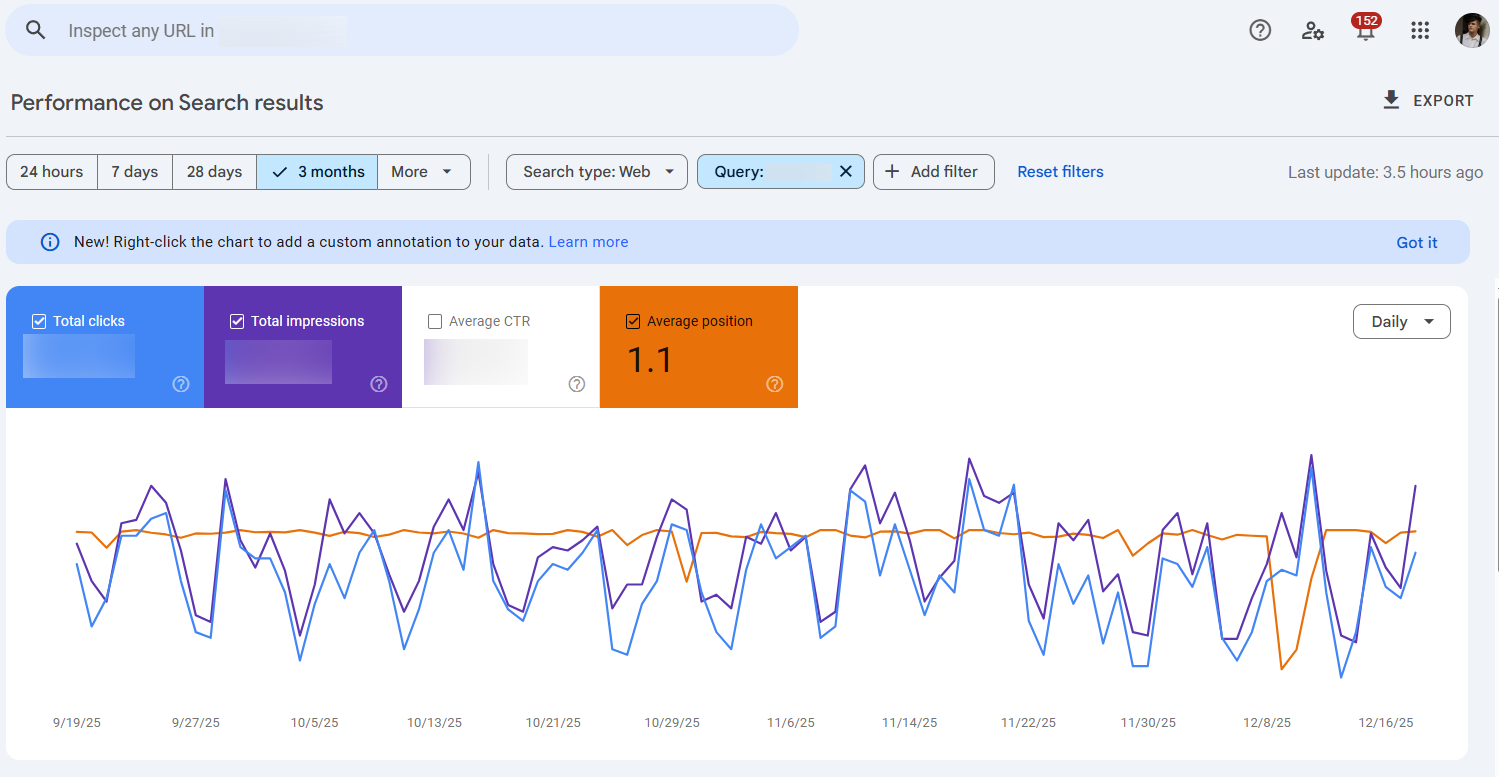
Performance → Search results → Pages or Queries → enable Average position
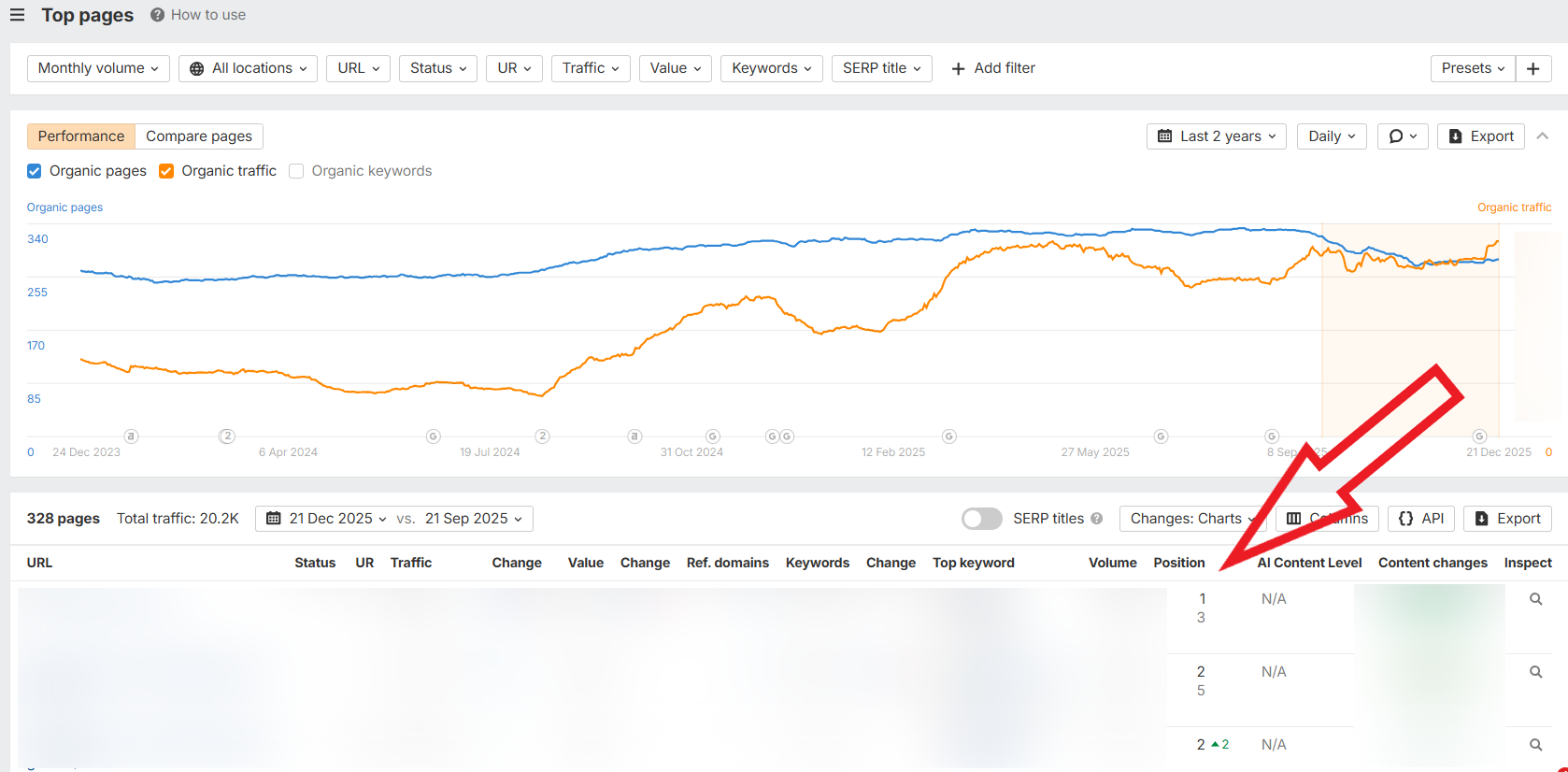
In Ahrefs or Semrush:
Organic Search → Top Pages
What low rankings mean and how to fix them
Low rankings usually mean your page is less relevant or less authoritative than competitors.
To improve rankings:
- Match search intent better than the pages above you
- Strengthen internal links and earn a few high quality backlinks
Organic Impressions
Organic impressions are when a user sees your page in a search result. If they click on it, it converts into traffic. If they don’t, it stays as an impression.
This metric tells you how visible your site is in Google, even before traffic happens.
You can get thousands of impressions with very few clicks if your rankings are low or your CTR is poor.
Impressions are a visibility metric, not a traffic metric.
Where to measure it
You can only find organic impressions in Google Search Console.
Third party tools do not show true impression data.
How to find the report
In Google Search Console:
Performance → Search results → enable Impressions
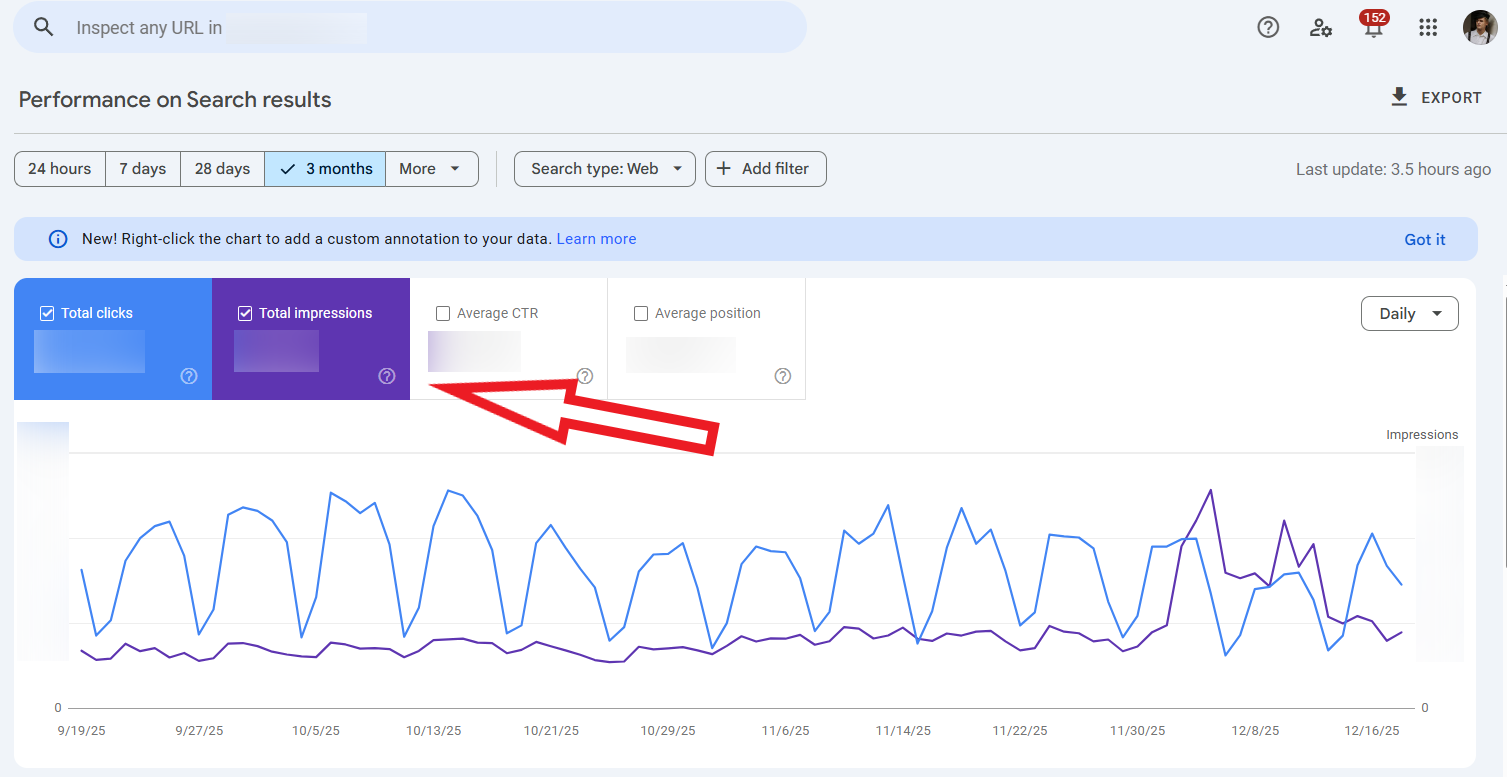
You can break this down by page, query, country, or device.
What low impressions mean and how to fix them
Low impressions usually mean you are not ranking for many keywords, or your pages are not indexed properly.
To increase impressions:
- Target more keywords around existing topics
- Fix indexing and crawlability issues in Search Console
Click-Through Rate (CTR)
CTR is – you guessed it – the rate at which users click through to your page.
It is the percentage of impressions that turn into clicks. If your page appears 1,000 times and gets 50 clicks, your CTR is 5 percent.
Where to measure it
Only Google Search Console provides a true CTR report.
How to find the report
In Google Search Console:
Performance → Search results → enable CTR
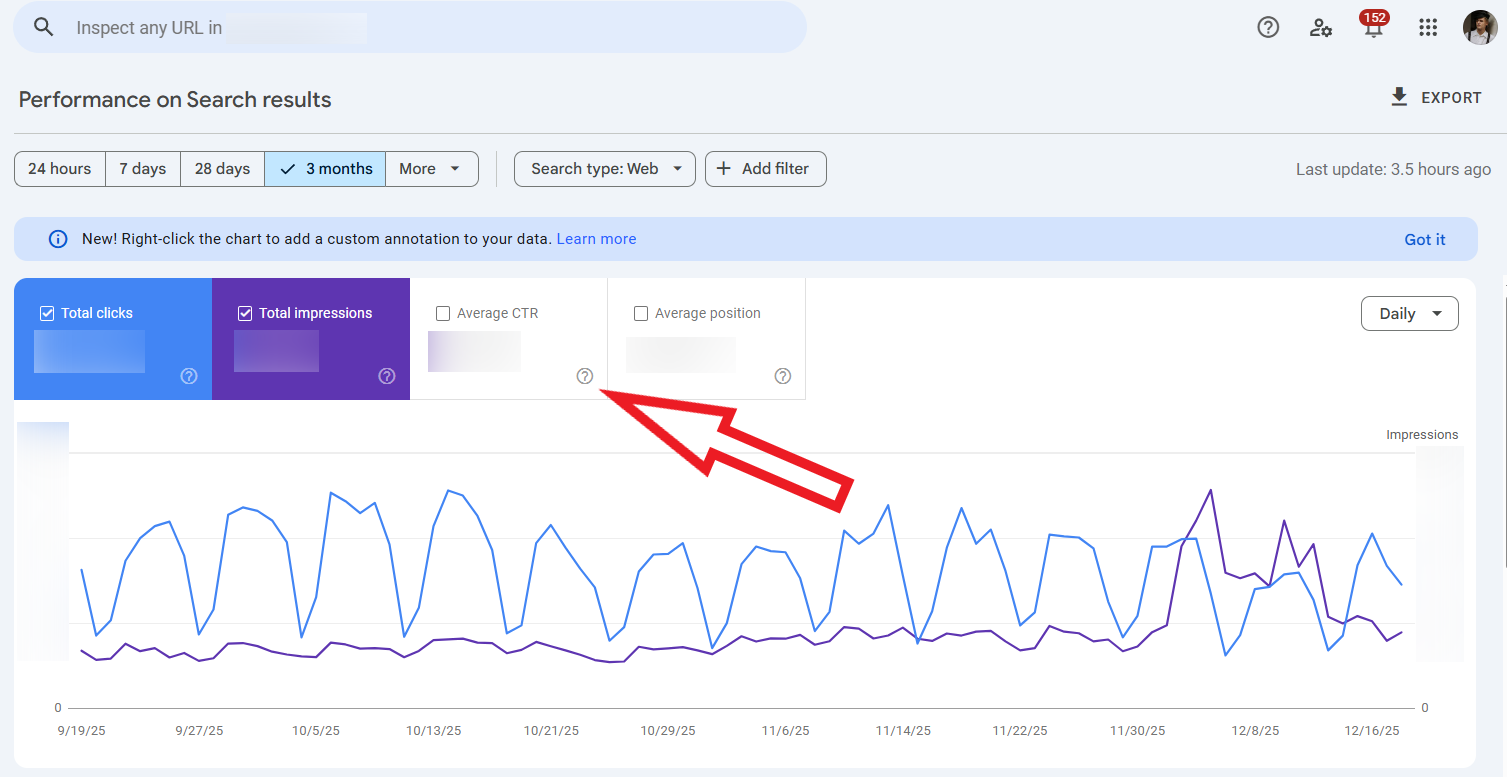
You can analyze CTR by query, page, or average position.
What low CTR means and how to fix it
Low CTR usually means your title or description does not stand out.
To improve it:
- Rewrite titles to match search intent and include clear benefits
- Use concise, descriptive meta descriptions that set expectations clearly
Referring Domains, Backlinks, and Link Velocity
If content is the foundation of SEO, backlinks are still the deciding factor.
Even today, with AI overviews taking up more and more space in search results, backlinks remain king.
To get featured in an AI overview and maximize ai visibility, your page usually needs to rank in the top 10 first. And ranking in the top 10 rarely happens on content quality alone.
- Backlinks are individual links pointing to your site
- Referring domains are unique websites linking to you
- Link velocity shows how quickly you gain or lose links over time
All three matter, but they do not carry equal weight.
Getting ten links from ten different websites is far more valuable than getting ten links from the same site.
New referring domains signal growing trust and authority. Repeated links from one domain help, but they have diminishing returns.
This is why referring domains are usually a better indicator of link strength than total backlink count.
Your link velocity should always be positive, or at least stable.
A steady flow of new links signals natural growth. Sudden drops can hurt rankings, while unnatural spikes can look suspicious. The goal is not explosive growth, but consistent progress over time.
Where to measure these metrics
You can track backlinks, referring domains, and link velocity in:
- Ahrefs
- Semrush
- Moz

Google does not provide detailed backlink reporting, so third party tools are essential here.
What weak link metrics mean and how to fix them
Weak link metrics usually mean your content is not being referenced or promoted enough.
To improve them:
- Focus on earning links from new, relevant websites
- Promote your best content consistently instead of relying on one-time link campaigns
Domain Rating
Domain Rating is one of the most misunderstood SEO metrics.
It looks official, but it is not a Google metric. Domain Rating is a third party score created to estimate the relative strength of a website’s backlink profile.
Usually shown on a 0 to 100 scale, DR reflects how strong your site’s backlinks are compared to others. It is calculated based on the number and quality of referring domains pointing to your site.
Google does not use Domain Rating directly, but the factors behind it still matter.
Websites with a higher Domain Rating tend to perform better in search results. That is because strong backlink profiles usually correlate with higher trust and authority.
Domain Rating also plays a big role in what keywords you can realistically rank for.
As a rule of thumb, you should focus on keywords with a difficulty score lower than your Domain Rating. If a keyword’s difficulty is higher than your DR, ranking for it will be an uphill battle, especially without exceptional links or topical authority.
Where to measure it
Domain Rating is measured in:
- Ahrefs, where it is called Domain Rating
- Moz, where a similar metric is called Domain Authority
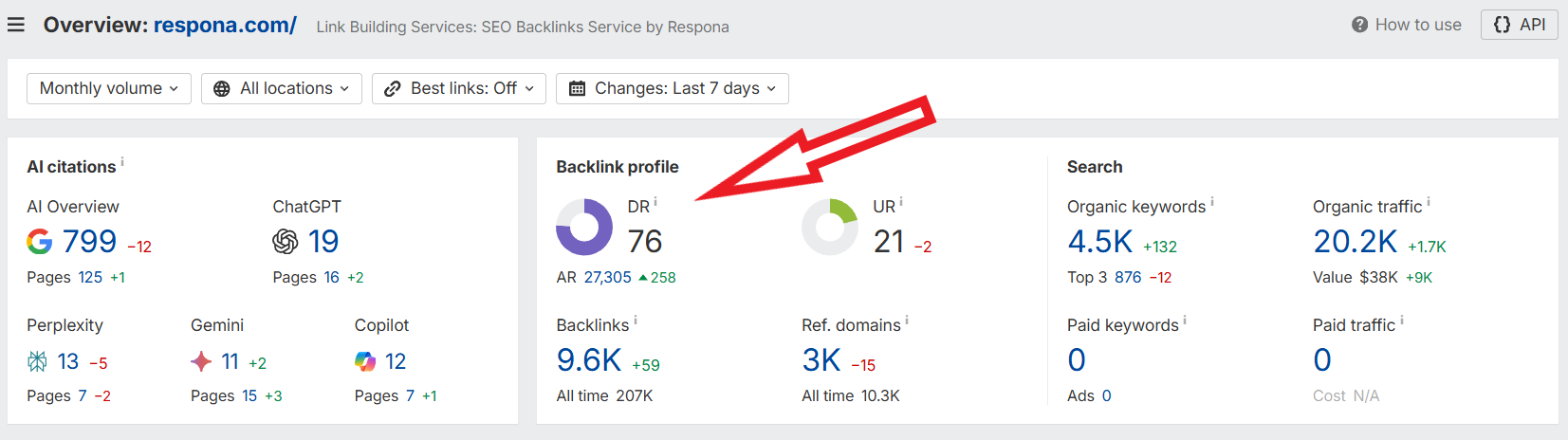
The names differ, but the idea is the same.
How to use Domain Rating correctly
Domain Rating is best used as a benchmark, not a goal.
Use it to:
- Compare your site to competitors
- Set realistic keyword targets
- Track long term backlink growth
Chasing the number itself does nothing. Improving the quality and diversity of your backlinks is what actually moves rankings.
Time on Page
Time on page shows how long visitors stay on a page after clicking it.
It measures the average duration users spend on a page. Longer time usually means the content matches search intent, while very short visits often signal confusion or disappointment.
It is not a direct ranking factor, but it reflects user experience quality.
Where to measure it
Time on page is measured in Google Analytics, using engagement and page metrics.
Search Console does not report time based engagement data.
How to find the report
In Google Analytics (GA4):
Reports → Engagement → Pages and screens → view Average engagement time
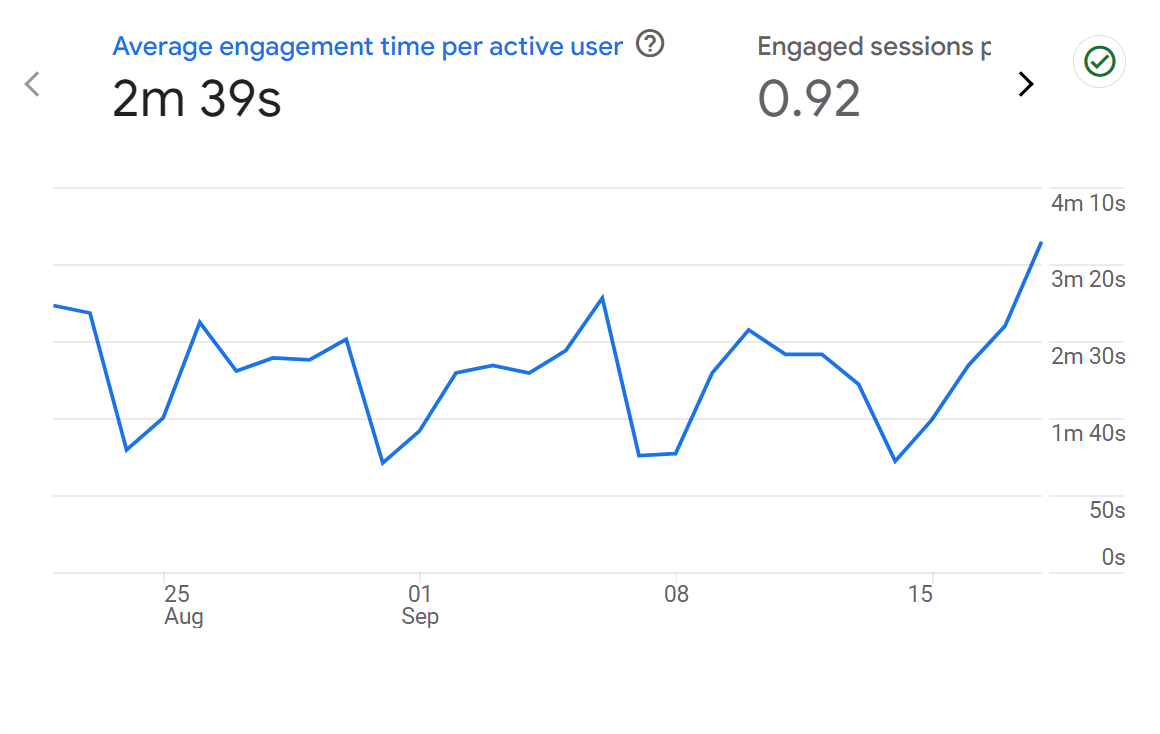
You can filter this by organic traffic to focus only on search users.
What low time on page means and how to fix it
Low time on page usually means the content does not answer the search query well.
To improve it:
- Match search intent more closely and answer questions faster
- Improve readability with clearer structure, visuals, and examples
Bounce Rate
Bounce rate shows how many visitors leave your site after viewing only one page.
It helps you understand whether users find what they were looking for, or leave immediately, which impacts user behavior and user experience.
What it measures
Bounce rate is the percentage of sessions where users do not take another action after landing on a page. A high bounce rate can mean poor relevance, confusing layout, or slow load times.
On some pages, especially informational ones, a higher bounce rate is normal. Context matters.
Where to measure it
Bounce rate is measured in Google Analytics, as bounce rate or its inverse, engagement rate.
Google Search Console does not track bounce rate.
How to find the report
In Google Analytics (GA4):
Reports → Engagement → Pages and screens → add Bounce rate as a metric
Filter by organic traffic to evaluate SEO performance specifically.
What high bounce rate means and how to fix it
A high bounce rate often means users did not find what they expected.
To reduce it:
- Improve page relevance and clarity above the fold
- Add internal links to guide users to related content
Page Speed
Page speed shows how fast your pages load and become usable for visitors.
It affects both rankings and user experience, which makes it one of the few technical metrics that really matters day to day.
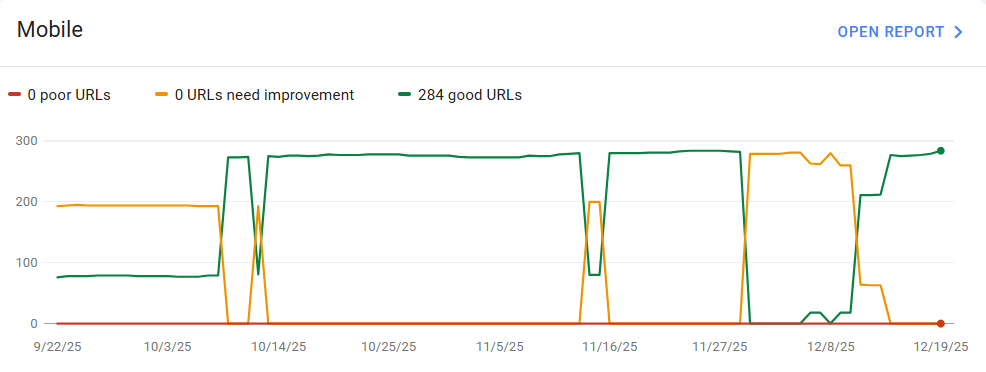
Page speed is measured through Core Web Vitals, which focus on real user experience:
- Largest Contentful Paint, how fast the main content loads
- Interaction to Next Paint, how responsive the page feels
- Cumulative Layout Shift, how stable the layout is while loading
Slow pages frustrate users and make them leave earlier.
Where to measure it
You can measure page speed in:
- Google Search Console, for site wide Core Web Vitals data
- PageSpeed Insights, for page level diagnostics
Third party SEO tools usually summarize this data but do not replace Google sources.
How to find the report
In Google Search Console:
Experience → Core Web Vitals
In PageSpeed Insights:
Enter a URL and review both mobile and desktop results.

What slow page speed means and how to fix it
Slow page speed usually means heavy images, bloated scripts, or poor hosting.
To improve it:
- Compress images and remove unnecessary scripts
- Prioritize mobile performance and use caching where possible
Link building cheat sheet
Now Over to You
Search engine monitoring does not have to be complicated.
If you track the right tools and a small set of meaningful metrics, SEO becomes predictable. You stop guessing, spot SEO issues early, and focus your effort where it actually moves rankings.
If you want to amplify your seo efforts with Google Ads or improve your local presence through Google My Business, consider how these channels work together with organic search. Even social media presence can support your overall visibility strategy.
For seo professionals looking to stay ahead, tools like Google Trends can help identify emerging opportunities before competition heats up.
One last reminder. Great content alone rarely ranks. Backlinks are still the strongest competitive advantage, especially if you want to break into the top 10 and maximize ai visibility in AI overviews.
If you want help earning high quality links from real, relevant websites, Respona’s link building handles exactly that.
Start building links that actually move rankings.
Frequently Asked Questions (FAQ)
What is search engine monitoring?
Search engine monitoring is the process of tracking how your website performs in search results over time. It helps you understand changes in traffic, rankings, visibility, and technical health so you can react before problems hurt your SEO.
How often should I monitor my seo metrics?
Core metrics like organic traffic and rankings should be checked weekly. Technical issues and backlinks can be reviewed monthly unless you notice sudden drops or unusual changes.
What is the most important metric to track?
Organic traffic is the best high-level indicator of success. However, it should always be analyzed together with rankings, impressions, and backlinks to understand why it changes.
Are third-party tools accurate?
Third-party tools provide estimates, not exact numbers. They are very useful for trend analysis, rank tracking, and competitor research, but Google Analytics and Search Console should always be your source of truth.
Can I do monitoring without paid tools?
Yes, you can cover the basics using Google Analytics and Search Console. However, without tools like Ahrefs or Semrush, you will lack backlink data and competitive insights, which limits growth potential.